Start here
Your seat just became an intelligence business.
Most of the owners you sell to lie awake over the same thing: what they do not know. A customer who left without saying why. A promise somebody made that nobody kept. This is the product that lets them stop guessing, fix things the same week instead of the next quarter, and back their own people with something better than a hunch. Read this page once, click through the demo once, and you are ready.
A note before you start
This is the part of the job I love. You already own the relationship, you already own the phone bill, and you are about to walk in with something your customer has been reading about for two years and could never actually buy.
Everything in this playbook is written so you can pick it up and use it the same day. Read this page once, click through the demo once, and you are ready. If anything here is unclear, or you hit something in front of a customer that this playbook did not prepare you for, tell me. I would rather fix it for everybody than have you work around it.
Let's crush this, together.
Jen Singer
Partnership Enablement, Tresic
What it is
It attaches to a seat you already sell.
There is nothing to install at the customer, nothing to migrate, and no second system for anyone to learn. Their phones keep working exactly the way they work today. What changes is that the conversations stop disappearing.
One seat, three products
After Call, First Alert and Insights Hub all come on the same seat. What differs between an individual, a manager and an executive is how much of the business that seat can see.
Never in the call path
It cannot drop a call, add delay, or touch call quality. It is usually the first thing a technical buyer checks.
It carries your brand
Branding is set during onboarding. Your customer sees your name on the product and on the notification emails, and buys it on the bill they already pay you.
Recording is the one prerequisite
The seat has to be recording already. There is no recording surcharge on top of what they pay today, but if nothing is recorded there is nothing to process.
The part that trips everyone up
What comes with the seat, and what gets added.
There is one seat. Everything below is on it from day one. Expanded is not a tier and not an upgrade path, it is three switches your customer turns on when their business asks for them. Learning this well is the difference between a clean quote and a conversation you have to walk back.
Two ways partners sell it
Most package it into a UCaaS seat they already sell, so the customer sees one richer seat and one line on the bill. Others add it to an existing account as its own line. Either works, and it does not change anything about how the product is configured.
Who actually uses it
The front line works their own conversations and their own tasks. Managers see everything across the account and receive the alerts. With Expanded Insights Hub there is an executive view that sees across every location, while each location's managers stay in their own.
| On every seat | Added when they ask for it | |
|---|---|---|
| After Call | Summaries of every analyzable conversation. Promises pulled out as tasks you can assign, date and track to done. Searchable history. Summaries land in email. | Expanded After Call. Manager-level access to the team's conversations and open tasks, and reporting split across teams, locations and organizations. Priced per seat. |
| First Alert | Two alerts, Upset Customer and Customer Threat, tuned to the industry, reaching the people the business designates within minutes of hang-up. Covers one group. | Expanded First Alert. Unlimited custom triggers and alert routing split across teams, departments and locations. Priced per group, and each group adds 3,000 pooled minutes. |
| Insights Hub | Conversation volumes, the topics coming up most, what is rising this week, and drill-through into the conversations behind any of it. Prepared questions across the account. | Expanded Insights Hub. Reporting, views and data access split by team, location and organization, with role-based access deciding who sees what. Priced per account. |
How to say it on a call
Every seat gets the summaries, the tasks and the two alerts. When they outgrow one shared view, there are three switches we turn on, and none of them is a migration.
After Call
Follow Through You Can See.
Your team's shared follow-through system
Every analyzable conversation comes back as a summary. Every promise made inside it becomes a task you can assign to any user, set a due date on, and track to done. The assigning is yours, and a task can go to anyone in the business, including people who never touched the conversation and people with no extension at all.
Summaries land in email, so nobody has to log in to get value on day one. History is searchable by name, number, summary, highlight, and transcript text.
Delivered same business day
Say it like this
"The bit your team keeps dropping is the promise made at minute eleven. This transcribes it every time, and it does it without anyone changing how they work."
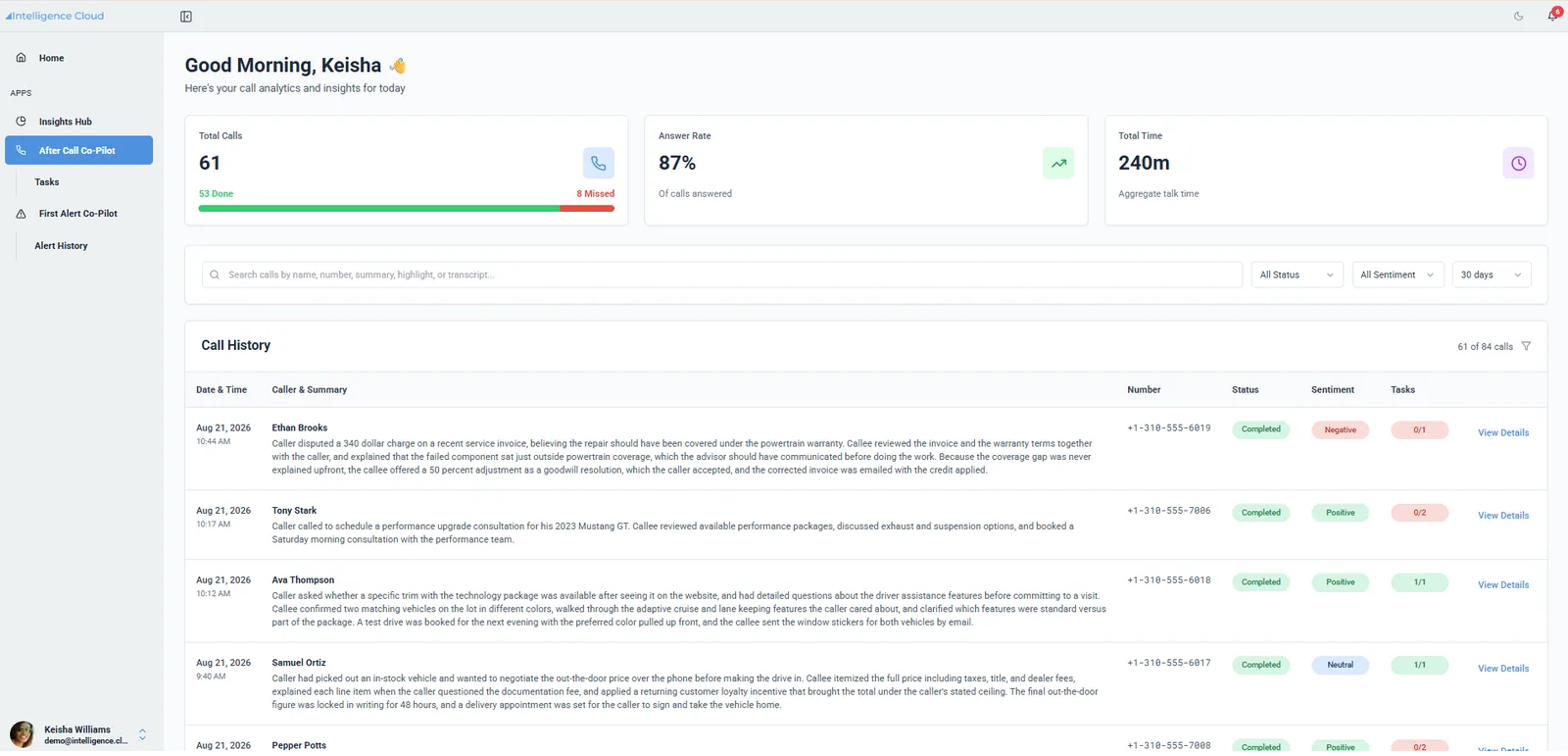
The real product. Call history, written summaries, and open tasks per conversation.
What lands in their inbox
The notification email is the thing that sells this. Call details, the summary, the highlights pulled out of the conversation, and the task with its owner and due date. It arrives under your brand.
One click copies the whole record into whatever they already use. No integration required to start getting value.
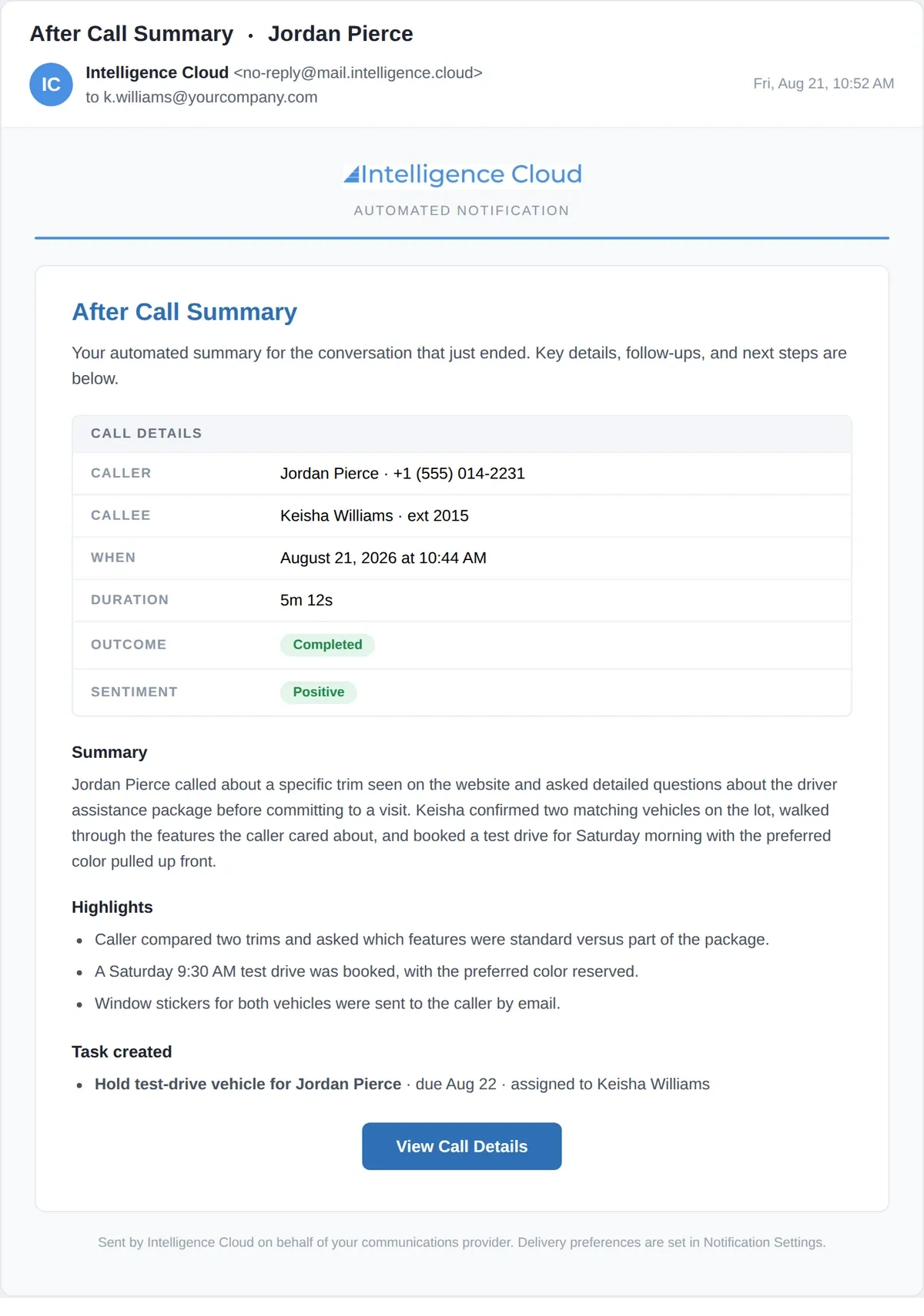
Sent under your brand, on behalf of your customer's communications provider.
First Alert
Seen in minutes. Act in time.
See it while you can still save it
Each conversation is checked against conditions the business sets. There are exactly three kinds: a keyword or phrase, a sentiment threshold, and a topic by name. When one matches, an alert reaches the manager the business designates, carrying the summary, the evidence, and the criteria that matched.
Most of the engineering here goes into what not to surface. An alerting product that fires on everything gets switched off in a week.
The two standard alerts, Upset Customer and Customer Threat, come tuned per industry and reach one group. Every group beyond the first is priced.
Delivered within minutes of hang-up
Say it like this
"Right now the owner finds out on Thursday that a customer walked on Monday. This tells them Monday, while they can still pick up the phone."
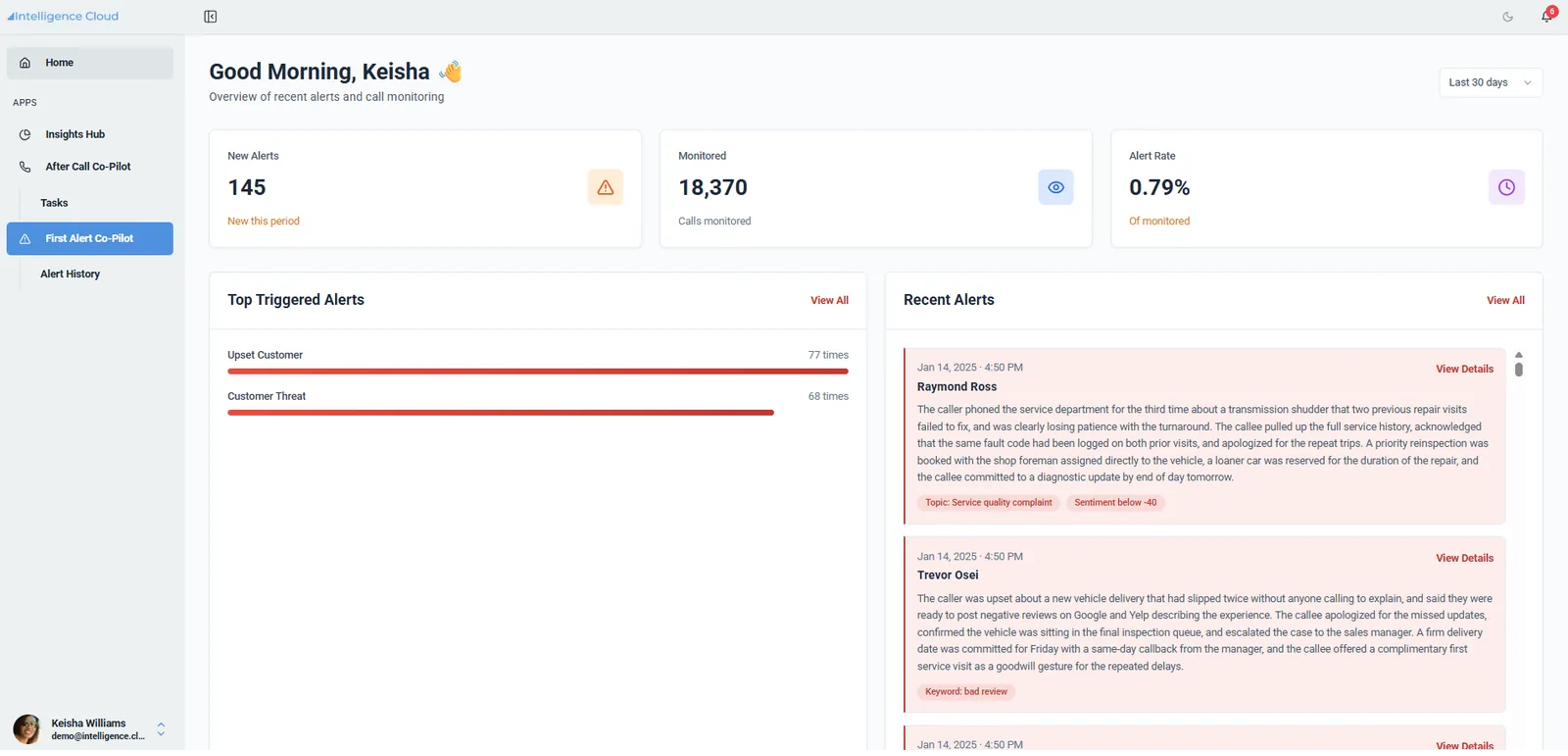
Three condition types on screen, and no more than three. That is the whole trigger model.
The single best thing you can show
The alert email carries a criteria block, so the manager can see exactly why it fired. It also carries the two sentences that answer the surveillance question before anyone asks it: the alert goes to a person, and nothing is routed, held, or decided by software.
Frontline users do not see alerts and do not see the alert views. That is a permission boundary, not a setting. Say it out loud on the call. For an owner, it is the difference between a management tool and something their team will quietly resent.
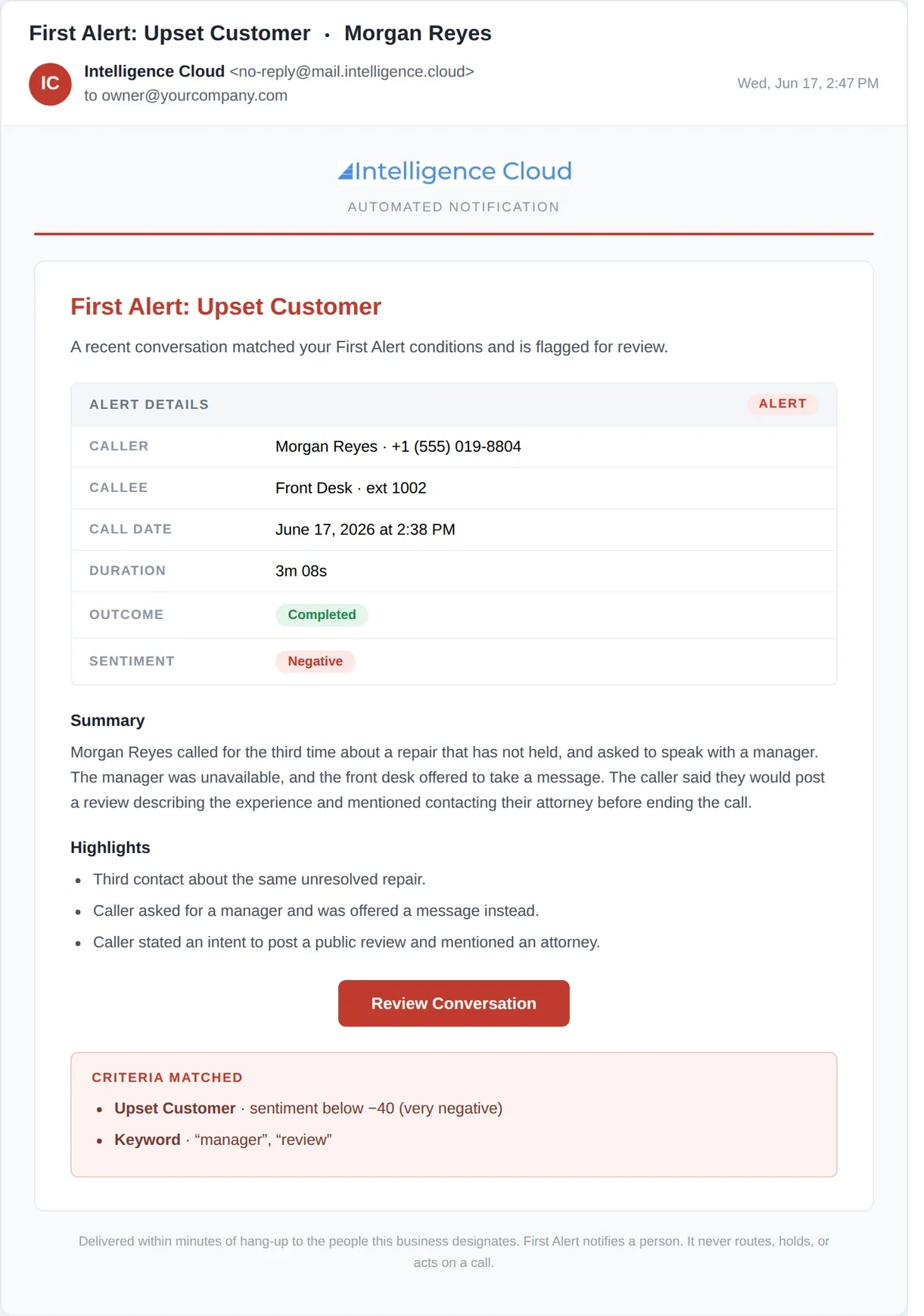
Criteria matched, evidence attached, and the non-routing rule stated in the footer.
The word that gets quoted wrong
What a group is.
Groups are how First Alert is priced, so getting the word wrong gets the quote wrong. This is the contract definition, not a paraphrase.
From the partner order form
A group is a team, a department, or a location configured within an end customer account. An account is a single end customer organization.
A group is whoever should get only their own alerts
The Ford store. The service department. The billing team. The Dallas site. If the people in it should see their own conversations and not somebody else's, it is a group.
One undivided feed costs nothing
Base access covers the two standard alerts going to one account-wide feed. A business happy with a single feed never pays for a group at all.
Once it splits, every group is priced
That is Expanded First Alert, at 3,000 pooled minutes a month per group. Two groups is two and five stores is five. There is no free one once the feed has been divided.
| The business | Alert feeds they want | Priced groups | Why |
|---|---|---|---|
| A two-line service shop | One, for the whole business | 0 | Base access covers a single undivided feed. Nothing to configure, nothing to price. |
| A single rooftop splitting service and sales | Two | 2 | The moment the alerts split, both feeds have to be configured. Two groups is two, not one. |
| A five-store dealership group | Five | 5 | The Ford store does not want the Subaru store's alerts. Five configured groups. |
| A thirteen-location RV group | Thirteen | 13 | Same reason, thirteen times. |
Ask it this way
"If an upset customer calls the Dallas store, who should hear about it, and should the Houston manager see it too?" Every "no, just them" in their answer is a group. If the answer is that everyone sees everything, it is one feed and costs nothing.
Do not confuse it with Insights Hub
Groups are alert routing, and they belong to First Alert. Per-location views are Insights Hub scope, priced per account rather than per group. The two get mixed up more than anything else in the product.
Insights Hub
See what your company is hearing.
The pulse of the business without listening to a single conversation
Trending topics with period-over-period comparison and volume counts. Spikes rise on their own. Conversation volume, answered and unanswered. Drill from any trend straight into the conversations sitting underneath it.
Ask Agent answers prepared questions across the whole account. Views are role based, so the business decides who sees what.
Updated same business day
Say it like this
"You used to know what was going on because you could hear the room. You have four times the people now. This is how you hear the room again."
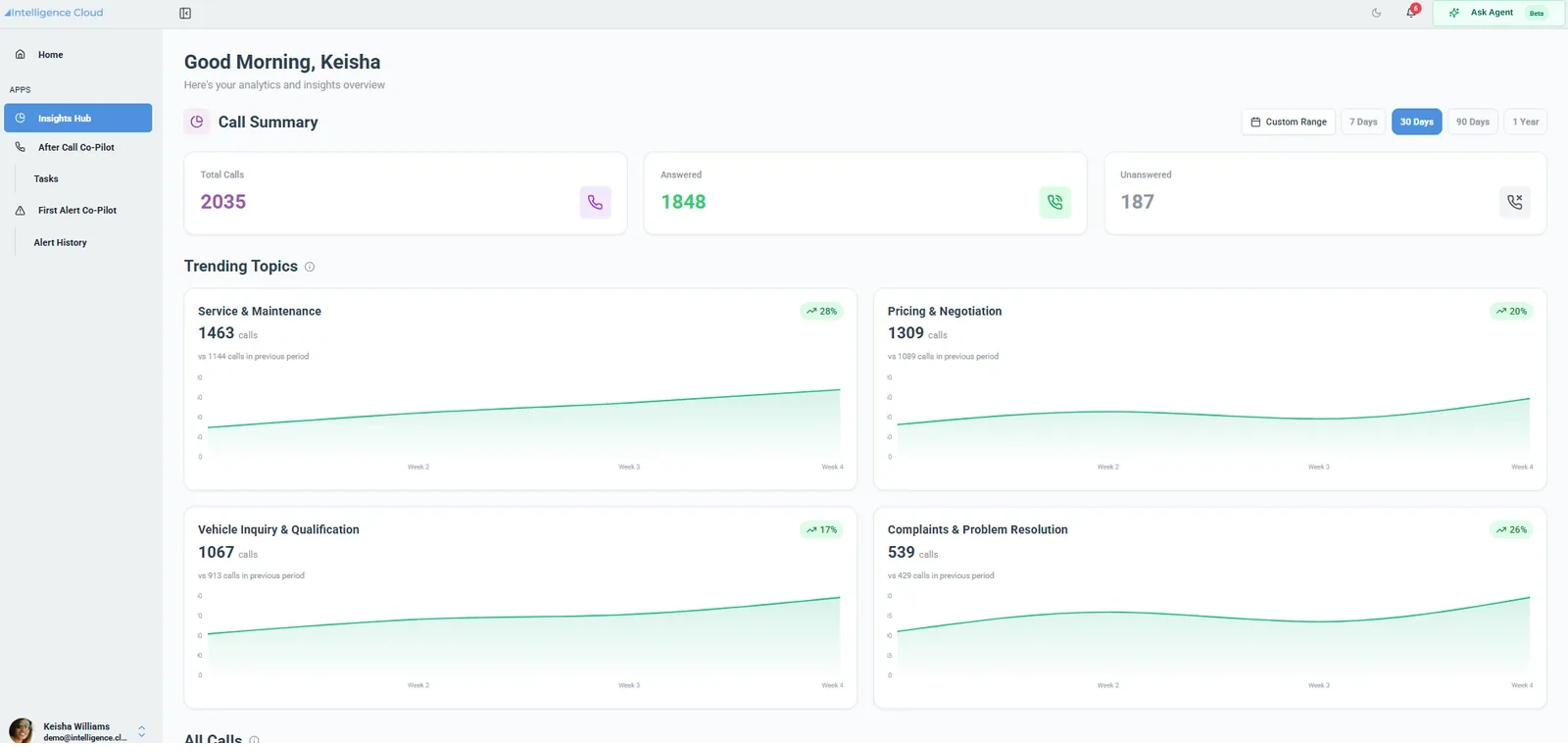
Trends with period comparison, and Ask Agent offering prepared questions.
What it is not
What it does not do, said plainly.
Our whole position is that we say what we do not do. That posture is worth more than any single feature, and it only works if it holds under pressure. Learn this column as carefully as the other one.
Real today
Summaries and tasks on every analyzable conversation
With an owner, a due date, and a status, assignable to anyone in the business.
Alerts within minutes of hang-up
On keyword, sentiment threshold, or topic. Evidence and matched criteria attached.
Trends, volumes, and drill-through
Period-over-period comparison, with the conversations underneath one click away.
Searchable history
Name, number, summary, highlight, and transcript text. On by default.
Payment card data redacted
Card data is redacted. That claim is correct and you may make it.
Your brand, end to end
Set during onboarding, including on the notification emails.
Per-location views and alert groups
Expanded, and quotable. The base seat reports the account as one view.
Not today, so do not imply it
No packaged CRM, PSA, EHR or DMS connector yet
Nothing writes into those systems out of the box today, and purpose-built connectors are on the roadmap without a date you may quote. What exists now is real: one click copies the whole record, and the webhook and API are open, so plenty of customers already push records into a CRM through their own integration or a workflow tool.
No side-by-side location comparison
Location is a scope. With Expanded Insights Hub each location's managers see their own and head office sees every location, with the top drivers listed per location. Nothing puts two sites next to each other on one screen, and nothing ranks them.
Ask Agent answers prepared questions
There is a question set that comes with the account, not an open text box. A typed question is recorded for us to review rather than answered, so show the prepared list and let the buyer pick one.
Alerts do not carry over between conversations
First Alert looks at one conversation at a time, so "called three times this week" is not something it can trigger on. Repeat problems show up in Insights Hub instead.
Nothing is routed or acted on automatically
An alert reaches a person and that person decides. The product never routes a call, holds a call, or takes an action on its own. For most buyers this is reassurance rather than a limitation, so say it plainly.
Before your first call
Four ways to trip, and how not to.
None of these are hard. They are the places where what people assume runs ahead of what shipped, and each one is much easier to avoid than to walk back.
01
Check that recording is already on
No recording, no record. We cannot turn a platform's recording on or off, and that control sits with the platform vendor. Confirm it in discovery rather than on the install call.
02
Never say real-time, and never say during the call
First Alert is within minutes of hang-up. After Call and Insights Hub are same business day. Those three phrases are locked. Swapping them is the fastest way to lose a technical buyer.
03
Minutes count both directions
A carrier bundle usually bills outbound only. Our pool counts inbound plus outbound together. A twenty-thousand-minute outbound bundle is not a twenty-thousand-minute account, and a partner sized a deal off one last week. Ask for the total, both directions, and never size from the phone bill.
04
Alert groups are First Alert, views are Insights Hub
Per-location alerts are First Alert groups. Per-location views are Insights Hub scope. They are two different lines on the quote and the two get mixed up constantly.
The question that comes up on every second call
Where does the data actually go?
What happens to a recording
The connector retrieves the recording and playback in the application is served from our copy, held under the stated retention schedule. Do not say recordings stay put or live on their platform. That is a data residency answer a security reviewer will test, and the comfortable version is the wrong one.
What gets covered
Every analyzable business conversation produces a record. Never say one hundred percent, never say full coverage, and never say every conversation rather than a sample. Coverage is bounded: no recording retrieved means no record, and excluded, personal, and robocall traffic is dropped.
Minutes and retention
Minutes, and where the recording lives.
The pool is inbound plus outbound
Shared across the account, so nobody hits a personal cap. A carrier bundle usually bills outbound only, so never size the pool from the phone bill.
Where the recording lives
The connector retrieves the recording and playback is served from our copy, under our retention schedule. Never say recordings stay put or live on their platform. That is a data residency answer a security reviewer will test, and the comfortable version is the wrong one.
Where to go next
You know the product. Now go use it.
Section two
Recording and Consent
Recording makes it work. What to say about consent, and the three handouts to leave behind.
Open →Section three
Competitors
What the phone companies charge for AI, and one brief and one handout for each of them.
Open →Section four
Demo and Discovery
The shared demo login, the four-screen walkthrough, and the questions that do the selling.
Open →Section five
Quote Builder
Set your markup, size the account, and print a customer-ready quote in your own brand.
Open →If you ever need help, reach out.
A question this playbook does not answer, a customer asking for something you are not sure we do, or a deal you want a second pair of eyes on. Any of it, any time. I would much rather take the call than have you guess.
Recording and consent
Recording makes it work. Clarity on consent keeps the deal moving.
Conversation intelligence runs on recorded calls, so recording comes up on every deal. What holds customers back is rarely the law itself. It is not knowing what the law asks of them. Share what you know, show them they control which calls get recorded, and let their policy and their counsel do the rest.
The frame for the whole conversation
They set the policy. You scope to it. Your customer decides which calls are recorded and how callers are told, working with its own counsel. You can scope recording to the lines, departments and call directions that fit that policy. Nothing here is legal advice.
Three things to know
Learn these and most of the conversation takes care of itself.
You turn recording on. We never add a second recorder.
Recording is enabled on the phone system you provide, line by line. Intelligence Cloud never records, never joins a call and is never in the call path. It works only from the recordings your platform already makes, so a line you don't record never reaches it.
Inbound is set once. Outbound is said every time.
Inbound disclosure lives in the greeting. Outbound calls have no greeting, so the person dialing has to say it.
Plan for a no.
If someone doesn't want to be recorded, the team needs a way to take that call without recording it. A call that isn't recorded never reaches us.
Say it like this
"If you record calls today, you already need a consent answer. For most businesses it's 'this is a recorded line' at the start of the call and a sentence in their agreements. I'll leave you the language."
The outbound opener your customer's team uses
Hi, this is [Name] with [Company], calling on a recorded line.
The 12 all-party consent states
CA · CT · DE · FL · IL · MD · MA · MT · NV · NH · PA · WA
Michigan is unsettled, so treat it the same. When callers are in different states, the stricter rule tends to win. The simple policy is the right one: disclose on every call, everywhere.
No IVR? Five ways to get consent
Most businesses use two or three.
01
A short recorded notice on the direct line
It plays before the call connects, so no phone menu is needed.
02
One spoken sentence at the start of the call
"Thanks for calling, this is Sam on a recorded line."
03
A clause in agreements, quotes and email signatures
For the repeat contacts they talk to every week.
04
Record only the lines that matter
The teams where follow-through is worth the most.
05
Record on demand, after the other person agrees
A star code or the record button on the active call.
Start small
They do not have to record everything.
Start with the front desk, service or dispatch. Start inbound only while the team builds the outbound habit. Leave sensitive lines out until they are ready. One catch: if outbound calls are still recorded on the phone system, they still need the disclosure.
| Industry | Start with | Leave out at first |
|---|---|---|
| Healthcare | Scheduling and billing | Clinical lines. BAA in place before any patient call |
| Law offices | Reception, scheduling, billing | Attorney lines, new-client intake, opposing counsel |
| Auto and RV | Service lane | Sales outbound until the opener is a habit |
| Retail | Store and customer service lines | Any state counsel has not signed off on |
| Home services | Dispatch and scheduling | Techs on personal mobiles |
On NetSapiens, it's all in the portal
Everything above is a setting, not a project.
- Record by user, call queue, device or the whole domain. Scope it to the teams in the customer's policy.
- Turn on the recording notice for a user. Inbound callers hear it before the call connects, so no IVR is needed.
- Record on demand. A star code or the record button on the active call starts and stops it. Codes vary by platform, so check yours.
- Outbound still needs the spoken line. The notice covers inbound only.
When they push back
Five answers worth knowing by heart.
| They say | You say |
|---|---|
| "We're in Florida. We can't record." | "Florida businesses record every day. They tell the caller first: 'this is a recorded line.' Plus a line in their agreements." |
| "We don't have an IVR." | "You don't need one. A recorded-line notice at the start of the call does the job, whether it plays automatically or your team says it. Staying on the line after that notice generally counts as consent. Here are five ways." |
| "My team will feel watched." | "It's there to catch what falls through the cracks, not to watch people. Nobody is scored or graded, and alerts go only to the people you pick." |
| "Aren't AI tools getting sued?" | "The cases are about callers who were never told. Telling them up front is the fix, and we'll help you set it up before anything goes live." |
| "Who's liable if we get it wrong?" | "You set the policy, same as you do for recording today. We bring the options and the language. Your counsel signs off." |
Where the law is going. These laws were written for wiretaps and are being updated for AI. California narrowed one piece of its privacy law on September 30, 2026, and the governor asked lawmakers to tackle the rest in 2027. The direction is clear: tell people. The timing is not, so never predict it.
Five ways to trip
Each one is cheap to avoid.
01
Never say "you're compliant."
Only the customer and their counsel can say that.
02
Never treat the disclosure as optional.
Every recorded call starts with "this is a recorded line," inbound or outbound.
03
Never say we monitor or listen.
Say it analyzes recorded calls after they end and surfaces what needs attention.
04
Never improvise what happens to their recordings.
Use the security pack word for word, or send it to me.
05
Never predict the law.
Say it is changing and the direction is disclosure.
Leave these behind
Two handouts for the customer.
Handout A
Recording consent without an IVR
The rules and the five options, in one page.
Open →Handout B
Disclosure language
Copy-ready lines for calls, agreements, email signatures and employees.
Open →General information, not legal advice. Sources: state statutes; Vibe, August 2026; K&L Gates, October 2026; Holland & Knight, October 2026; Courthouse News, October 2026.
Compliance brief
Recording consent on everyday business lines.
Your
logo
here![]()
logo
here
Call centers announce recording through an automated menu. Most businesses don't have one. Here's how they get consent anyway.
12
states require everyone on the call to know, and in most of them to agree
5
practical ways to get consent on a direct-dial line. Most businesses use two or three
1
simple policy that covers all of it: disclose on every call
Five ways to get consent
The law requires consent, not an announcement.
Option
What it looks like
Announcement on the line
A short recorded notice when a call reaches someone's direct number.
Spoken disclosure
“This is a recorded line” at the start of the call.
Standing notice
A line in your agreements, quotes and email signature for clients you talk to often.
Choose which lines record
Record only the teams where follow-through matters most.
Record on demand
Start recording after the other person agrees.
Who has to agree
Federal law allows recording when one person on the call agrees. In 12 states everyone on the call has to know.
When callers are in different states
The stricter rule tends to apply.
The simple policy
Disclose on every call. It covers you everywhere and takes one sentence.
The law requires consent, not an announcement. On a direct-dial line there are five practical ways to get it.
The 12 all-party states
The list. California, Connecticut, Delaware, Florida, Illinois, Maryland, Massachusetts, Montana, Nevada, New Hampshire, Pennsylvania and Washington.
Michigan. Unsettled, so treat it the same way.
Across state lines. When callers are in different states the stricter rule tends to apply, which is why one policy is simpler than twelve.
Three things businesses miss
- Say it every time. Inbound or outbound, the call starts with “this is a recorded line.”
- Plan for a no. Have a way to take the call without recording it.
- Tell your team first. Employees are on every call too. Give them written notice before recording starts. New York, Connecticut and Delaware require it.
Ask your provider to walk through the five options with you.
Talk to [Your company]
General information, not legal advice. Recording law varies by state and changes often. Have your counsel approve any disclosure before it goes live.
Copy and adapt
The words, ready to use.
Your
logo
here![]()
logo
here
Starting points. Your counsel approves before anything goes live.
7
places a disclosure belongs, from the phone greeting to the employee notice
1
sentence covers most of them: “this is a recorded line”
2
industry add-ons, for healthcare and law offices
Where it goes, and what it says
Copy these, change the bracketed parts, send them to counsel.
Where it goes
What it says
Outbound call
“Hi, this is [Name] with [Company], calling on a recorded line.”
Answering a direct line
“Thanks for calling [Company], this is [Name] on a recorded line. How can I help?”
Recorded announcement
“Thanks for calling [Company]. This is a recorded line.”
If someone says no
“No problem. I'll [stop the recording / call you back / take notes by hand].”
Email signature
“Calls with [Company] are recorded.”
Agreements and quotes
“Phone calls between the parties may be recorded. Either party may ask at the start of a call that it not be recorded.”
Employee notice
“Calls on company lines are recorded and analyzed, and a few defined alerts go to the managers we name. Calls are not scored or graded.” Signature and date.
If your counsel wants more
“This is a recorded line, and calls may be analyzed by automated tools.”
One sentence at the start of the call does most of the work. The rest is there for the places a sentence cannot reach.
Industry add-ons
Healthcare, notice of privacy practices. “We record calls with our office. Recordings are handled by our service providers under business associate agreements.”
Law offices, engagement letter. “Calls with our office may be recorded. We won't record calls with you without your agreement, and you can ask us to stop at any time.”
Before you use any of it
- Counsel approves the wording. These are starting points, not finished policy.
- Pick two or three, not all seven. The spoken line plus a clause in agreements covers most businesses.
- Write the employee notice first. It is the one most often forgotten and the one three states require.
Pick two or three, then send them to your counsel.
Talk to [Your company]
General information, not legal advice. Have your counsel approve any disclosure before it goes live.
Who it is for
Start with every customer who already has call recording turned on.
They already pay to record their conversations and get nothing back. Pull that list from billing today. It is your first campaign.
Then think about three things
What tells you a customer is ready.
Who answers the phone all day
A front desk, service desk, parts counter or dispatch team is where it pays off fastest.
How many locations or teams
Past one site or one team, the owner can no longer hear the business. Match them to one of the four targets below.
What just changed
A new location, a sale, a new manager or a bad week of reviews makes it urgent.
Four target customers for conversation intelligence
Find yours, then use its opener.
Each one answers the phone differently, worries about something different, and needs a different first sentence from you.
Target one · Owner-run shop
The owner who used to answer every call.
"How do I know the shop is OK when I'm not on the phone?"
One site, one team, 5 to 40 phones. The business grew past what one person can hear, and the owner still feels responsible for all of it.
Where they are on your base
Independent auto service and tire shops. Trades with a booking or dispatch desk: HVAC, plumbing, electrical. A single medical or dental practice. A specialty store or showroom.
How to open it
"When something goes wrong on a call, how long until you hear about it?"
Ask for the owner. They decide in one conversation.
Why now
TechForce finds automotive technician supply covers only 59% of annual demand (TechForce, May 2026). Fewer technicians means more customers per advisor, and more promises made on the phone that nobody tracks.
The line that lands
They can't be on every call. Show them they don't have to be.
Target two · Departments under one roof
One building. Three teams. One person answering for all of them.
"Why am I still the switchboard?"
One site, several teams on the phone, 20 to 150 phones. Every team thinks another one has it, so every problem lands on the GM's desk.
Where they are on your base
A dealership with service, parts and sales. A practice with scheduling, billing and a nurse line. A showroom with sales, delivery and installation. Any office where the front desk transfers more than it resolves.
How to open it
"When a customer calls back angry, which team usually dropped it?"
Ask for the GM, the practice administrator or the service director.
Lead with
The seat, plus full First Alert so each team gets its own alerts rather than one feed everybody ignores.
The line that lands
Problems go to whoever owns them. The GM gets their day back.
Target three · Multiple locations
Same company. Very different operations.
"What should I fix first?"
Three sites or more. The owner sees numbers by location and none of the conversations behind them.
Where they are on your base
Dealer and RV groups. Clinic, dental and imaging networks. Multi-store retailers where customers call before they buy: furniture, flooring, appliance, mattress, tire. Multi-branch service companies.
How to open it
"Which location keeps you up at night, and do you know why?"
Ask for the director of patient experience, the fixed ops director, or the VP of retail or
regional operations.
Lead with
After Call and First Alert, plus Insights Hub from three sites, so head office sees every location and each location's managers see their own.
Why now. Kerrigan counts a record 462 dealership transactions covering 724 franchises in the year to June 30, 2026 (GoodCarBadCar, Sep 2026). PwC found physician groups took a record 46% of Q1 2026 healthcare deal volume, mostly as add-ons to existing platforms (Becker's, Jun 2026). Every acquisition adds a site that answers the phone its own way.
The line that lands
The answer was always in the calls. Now it's in front of the people who decide.
Target four · Account and support teams, starting with yours
The team that's busy all day and can't say on what.
"Where are my hours going?"
Help desks, account managers and customer service teams who talk to the same customers over and over.
Where they are on your base
Your own support and sales lines, the first account to turn on. MSP service desks. Customer service teams inside your larger accounts.
How to open it
"What does your team spend the most hours on that nobody chose?"
Do this first
Get your own line on it before your first customer call. Your own calls are the best demo you will ever give.
The line that lands
Look up a customer before you call and see every issue they've raised with any team.
Not a fit
Say so early. It costs one deal and buys the next ten.
- Contact centers of 500 seats or more.
- Teams whose calls live on personal mobiles.
- eCommerce-only businesses.
- Anyone shopping for a way to rank or watch their staff. We're built for improvement, not surveillance.
Work the section in order
Pick the customer, then use the words.
Step one
What to say
Three lines to lead with, and the ones never to use.
Open →Step two
Email templates
Five you can send today. Change the brackets, nothing else.
Open →Step three
Phone scripts
Lead with a customer story, finish by offering a demo.
Open →Step four
Customer handout
The one-pager to send in the same minute you call.
Open →Figures come from real customer conversations analyzed by Intelligence Cloud, not industry averages. Customers, employees and places are anonymized. Findings and outcomes vary by customer, based on base seat and expanded functionality configurations.
Easy attach · What to say
Easy attach · What to say
Three things worth saying.
Say these three, send the one-pager, and get them thinking about what is hiding in their own conversations. Most owners decide once they have seen their own kind of conversation, not from a description of it.
1. Every commitment becomes a task
Hang up, and the summary is there. Every promise made in the conversation becomes a task you can assign to any user, give a due date, and track to done.
2. The costly moments reach a person
An upset customer, or a customer threatening to leave, reaches whoever you choose within minutes of hang-up, with the summary and the evidence attached.
3. You see what the business is hearing
Volumes, the topics coming up most and what is rising this week. Click any of it and land in the conversations underneath.
Captured and assigned. Seen in minutes. Visible across the business. That is the entire pitch.
Quick reference
Say the one on the left.
✓ Say this
“Every commitment becomes a task.”
This is the difference between us and every AI note taker on the market. Lead with it.
“Within minutes of hang-up.”
True and specific. They will test it in the first week.
“On the phone service you have today.”
The biggest difference between you and everyone else selling AI.
“Nothing changes about how a conversation is placed or answered.”
Their first worry is retraining staff. Take it off the table early.
“A few dollars more on the seat.”
Signals an add-on, not a project.
✗ Never say this
“Real time.”
Alerts come within minutes of hang-up, never during the conversation. Say the true thing.
“It listens to your calls.”
It surfaces and it notifies. It never routes a conversation, takes an action or decides anything on its own.
“Search every conversation.”
What is included is a set of prepared questions across the organization. Free text search is not in it.
“Your managers can see the team's conversations.” Included, in the manager shape. The individual shape sees only its own conversations and its own tasks.
Not included. What is included is scoped to the individual. Team views are an upgrade.
Anything that sounds finished.
Follow-ups are captured and assigned, not done. Never describe work the customer still has to do as completed.
Easy attach · Email
Easy attach · Email
Five options. Swap the brackets, change nothing else.
Pick whichever fits the account in front of you. Say less than you want to, send the handout, and stop typing.
Option oneWhen there is no particular reason, you just want to tell them
SubjectSomething new on your phones
Hi [first name],
We have added something to the phone service you already have with us, and I thought of your team when it came through.
Every analyzable conversation on the lines you monitor is processed and comes back as a summary, the promises made in it turn into tasks you can hand out and track, and if someone gets upset on a call you hear about it within minutes rather than at the next review. Nothing to install, and nothing changes for the people answering the phone.
I have attached a page on it. Easier to show you than write about it, so when can we snag twenty minutes for a demo to walk through it?
[sign off]
Option twoWhen they already have recording switched on
SubjectThe recordings you are already paying for
Hi [first name],
You switched recording on a while back, and I would guess nobody has listened to much of it unless something went wrong.
We can now do something with it. Every analyzable conversation on a monitored line comes back summarized, every commitment made in one becomes a task you can assign and track, and the calls that went badly reach whoever you choose within minutes. Same phones, same handsets, same desks.
A page on it is attached. When can we snag twenty minutes to look at it on a real account?
[sign off]
Option threeThe short follow-up when nobody replied
SubjectRe: Something new on your phones
Hi [first name],
Bumping this in case it got buried.
Short version: your conversations come back as summaries, the promises in them become tasks, and the ones worth knowing about reach the right person the same day.
Worth twenty minutes to see it, or shall I leave it? Either answer is fine.
[sign off]
Option fourAhead of an account review, and the one most reps will use
SubjectAhead of our account review
Hi [first name],
Before we sit down for the account review, there are a couple of new things your phones can do that I would like to walk you through while we are together.
The short version is that your conversations are analyzed and come back as summaries, the promises made in them become tasks somebody can pick up, and when a customer is upset or at risk of leaving, the person you choose hears about it within minutes instead of finding out from a review weeks later.
I have put a page in with this. Do you want me to bring it to the review, or can we snag twenty minutes before then to walk through a demo?
[sign off]
Option fiveWhen they have asked what it actually turns up
SubjectWhat a week of calls actually looks like
Hi [first name],
You asked what this actually finds. Easier to show you than describe it, so I have attached a week from a business about your size.
A third of the customer calls were somebody asking about a job already in progress. A quarter of the complaints were a call-back that was promised and never happened. Half the calls finished with someone still owing a next step, and nobody could have told you which half.
None of that is a projection, it is just what the calls said. If any of it sounds familiar, when can we snag twenty minutes to look at the rest on a real account?
[sign off]
Subject lines by vertical
Swap the subject, keep the body.
Option two and option five both work in any vertical. The subject line is what decides whether they open it.
| Vertical | Subject line |
|---|---|
| Dealership service | How many of this week's calls were "is my car ready?" |
| Clinic front desk | The callbacks your front desk promised last week |
| Multi-location retail | What your stores promised on the phone yesterday |
| Service business | The one call this week you would have wanted to hear about |
Easy attach · Phone
Easy attach · Phone
Four scripts. Read each one out loud once.
These are for people who know you already. Lead with a story about another customer, not with the product, and finish by offering to show them rather than asking them to decide.
VoicemailAbout twenty seconds
Hi [first name], it's [rep] at [company]. We have started doing something for a few customers that I think would land well with your team, and it runs on the phones you already have. Give me a call back and I will walk you through what it looks like, or I can send a time over. [number].
Do not explain it on a voicemail. You are asking for fifteen minutes, not making the case. Send the one-pager after you hang up so there is something sitting in their inbox when they think about it.
They picked upAsk, then listen
Glad I caught you. Let me tell you what conversation intelligence is doing for a few of our customers right now, because I think it is the sort of thing you would use.
One of them is a service business about your size. The owner used to find out about an unhappy customer when the review showed up. Now when someone gets upset on a call, he hears about it the same morning, and he has turned a few of those around before they ever became a problem.
Does that sound like anything you deal with?
One of them is a service business about your size. The owner used to find out about an unhappy customer when the review showed up. Now when someone gets upset on a call, he hears about it the same morning, and he has turned a few of those around before they ever became a problem.
Does that sound like anything you deal with?
Then stop and let them talk. Most owners will tell you about their own version within a sentence or two. When they do: that is exactly what this does. Let's find twenty minutes and I will walk you through a demo on real calls.
At a renewal or reviewAbout thirty seconds, and this is where most of it gets sold
Before we get into the numbers, there are a couple of new things your phones can do that I want to show you while we are sitting here.
Quick question first, and it is the one that usually opens this up. What were today's calls about, and do you know how each of them was handled?
Quick question first, and it is the one that usually opens this up. What were today's calls about, and do you know how each of them was handled?
Almost nobody knows, and most will say so. That gap is the whole conversation and it is better in their words than yours. Then show them the one-pager, or book the demo if there is no time. Do not open a deck at an account review.
If they answer "I talk to my customers every day"One question
You do, and that is exactly why this is for the calls that happen when you are not standing there. Can I ask how you found out about the worst customer problem you had this year?
Listen for the delay. A review, a cancellation, days later. They have just described the problem for you, so you do not have to.
Every call ends the same way
Send the handout, then get them looking at their own conversations.
Conversation intelligence, on the phones you have
Follow Through You Can See.
Your team already does the only thing this needs. They answer the phone. Nothing to install, and nothing changes about how a conversation is placed or answered.
Your
logo
here
logo
here
What is happening today
Your best information walks out the door, one conversation at a time.
A callback was promised and nobody followed it up. The same complaint came in for the fourth time this month and no one joined the dots. A conversation happened that was going to cost you a customer, and you found out after they had already gone. None of it was captured, because capturing it was never anyone's real job.
From the day it is switched on
Every commitment becomes a task
The summary is there the moment you hang up, and every promise made in the conversation becomes a task you can assign, give a due date, and track to done. Hand it to anyone in the business, including people who never touched the conversation.
The costly moments reach a person
An upset customer, or one threatening to leave, reaches whoever you choose within minutes of hang-up, with the summary and the evidence attached. While you can still do something about it.
What your business is hearing
Volumes, the topics coming up most and what is rising this week. Click any signal and land in the conversations underneath it.
What changes for your team
✓
Nothing to install, on any phone or any computer.
✓
Nothing changes about how a conversation is placed or answered.
✓
No note taking, no forms and no writing up afterwards.
✓
Summaries arrive by email, so nobody has to log in to anything.
Built to help the business, not to watch your people.
Card numbers are removed before anything is analyzed. Calls detected as personal are dropped before analysis. Anything sensitive left in a business call is flagged, access controlled and logged. Recording on your phone service is the one thing that has to be switched on already. There is no recording charge on top of what you pay today. Nothing happens on its own. A person always sees it and decides what to do.
Ask us to switch it on.
It turns on for the seats you already pay for, including people in the business who never touch a phone. Ask us what it looks like on your own conversations.
Talk to us
There is more as you grow. Expanded After Call adds manager visibility across a team's conversations and open follow-ups in one place. Expanded First Alert adds alert conditions written for the business, on keyword, sentiment, or topic, each with their own recipients. Expanded Insights Hub adds wider scope and access control, configured by [Your company] for the business. Conversation data is handled under your existing service agreement with [Your company]. [Your company] sets who receives alerts and who can see which views.
Proof and use cases
Proof that sells.
Every number and story here came from real calls. Find what your customer is worried about, tell the story in thirty seconds, and send the matching page after the call.
Step one
Start with what they're worried about.
Owners don't buy conversation intelligence. They buy an answer to a question that keeps them up at night. Listen for the question, then use the row that matches.
| What they say | The number that answers it | Tell this story | Send this page |
|---|---|---|---|
| "Are my people getting better?" | On complaints that were turned around, the employee explained why it happened 67% of the time. On the ones that weren't, 19%. That is a habit you can coach. | Four calls, four owners | Coach from the calls that went right |
| "Why do customers keep calling back upset?" | At three dealer groups, one in four service complaints was a call-back or status update that never came. Not the repair. The phone. | The warranty nobody cancelled | Your biggest service complaint is the phone Keep every promise your service drive makes |
| "Who's about to leave?" | 14 of 15 accounts that cancelled at two providers sounded perfectly friendly on every call. The warning was in what they asked for: a port-out PIN, a contract question. | The customer who had already decided | Your churn doesn't sound angry Know the account before you pick up |
| "What should I fix first?" | At a 58-location imaging group, one center's reminder calls reached patients 68% of the time and another's 26%. Same calls. The likely cause was outdated numbers and call timing, not staff. | What patients said, by center | Same company. Very different operations Reach the patient back today |
| "Where are my hours going?" | A two-shop repair business spent about 15 hours in one week answering "where's my car?" A managed IT help desk spent 26 on password resets. Both are fixes with a number on them. | The van that kept coming back | Where your help desk's week actually goes Know the shop is all right |
Step two
Six stories, thirty seconds each.
Real calls, names already changed. Tell one, then ask the question underneath it and stop talking.
A four-store dealer group · for GMs, dealer principals, F&I
The warranty nobody cancelled
A customer called about a warranty cancellation he never asked for. By midday he and his wife were talking about "forgery and fraud." Over two days it took about a dozen calls and six employees, each fixing a piece on a different call. The one thing he asked for, a call from someone in charge, never came.
"The court of public opinion is worse than anything anyone can say."
With it on their phone service. The GM sees it within minutes of the midday call, rings him herself, covers the deductible and walks the form to her F&I director. One call from the right person instead of twelve from the wrong ones.
Standard: Customer Threat, to the GM. Custom: disputed F&I document, to the
F&I director.
Ask next: when a customer mentions a lawyer, who hears about it, and how fast?
An RV dealership · for service directors, group leaders
"I need somebody that's in charge"
A camper was back for the same problems and was not going to be ready for the family's trip. The customer asked for whoever was in charge of service and mentioned a lawyer. The employee could not reach the VP of service and promised to pass it along. Eight days later there is still no call from the VP anywhere in the recorded calls. He never knew the conversation happened.
"We're fixing to start bashing, and we're going to get a lawyer."
With it on their phone service. The VP sees it within the hour with the repair history attached, calls back, and covers a weekend rental. If he does not act within the hour, the GM gets it.
Standard: Customer Threat and Upset Customer, to the VP. Custom: backup to the GM
after an hour.
Ask next: your best person can't be reachable every minute. When they aren't, what happens?
A cloud phone provider's support desk · for provider CEOs, account managers, billing leads
The customer who had already decided
A business owner complained about a billing employee and mentioned his lawyer. The agent handled it by the book. Within a day the owner asked for the PIN to port his numbers. He did not decide that day. He decided over the earlier calls nobody heard.
"Your company is becoming very troublesome to me."
With it on their phone service. The first sharp exchange on the billing line reaches the billing manager the day it happens. That is the call where the account could have been kept.
Ask next: how do you usually find out a customer has decided to leave?
A managed IT and voice provider · for service desk leads
Four calls, four owners
One Wednesday at one service desk: an office downsizing to two phones, logged as a ticket. A customer locked out of everything, calling back because the promised call never came. A technician rescuing a site's printing after a move. Two technicians called "magic" by their customers. Every one was logged somewhere. None reached the person who owns that risk, or that good news.
With it on their phone service. Lost business to the account manager, the missed callback to the desk lead, saves and praise to the queue.
Ask next: who owns a downsizing call at your company, and how do they hear about it?
An independent repair business · for owners of service businesses
The van that kept coming back
A year-old van had been in and out for months. It stalled in traffic with a child in the car. The customer rang and said it had become a hazard. The shop found the fault and handled him well, and the owner heard none of it until long after.
With it on their phone service. Safety language after a repair goes straight to the owner. He sends a tow instead of asking a frightened customer to drive the van in, and he knows which of his people got it right.
Ask next: if something unsafe came up on a call today, how would you find out?
A 58-location imaging group · for administrators, patient access
What patients said, by center
61% of outbound reminder, results and scheduling calls never reached the patient. One center reached patients 68% of the time and another 26%, on the same kinds of calls. The likely cause was outdated numbers and call timing, not staff.
With it on their phone service. The flagged frustration moments get called back the same week, starting with billing, and the group tests what the highest-reach centers do differently.
Ask next: which location keeps you up at night, and do you know why?
Step three
The numbers, and how to say them.
Copy these into an email or a proposal as written. Each one carries its own frame, so it never reads as an industry average.
Dealerships and service departments
Three vehicle businesses, 18 locations, Oct 1 to 8, 2026. 19,012 calls, 9,843 with a customer.
| Figure | How to say it |
|---|---|
| 1 in 4 | of 518 service complaints was a promised call-back or status update that never came. The largest driver, ahead of any repair. |
| 187 of 518 | service complaints were about reaching someone: call-backs, holds, messages, status. The single biggest thing a service department can fix. |
| 33% | of customer calls were about a vehicle already in service. More phone time than any other topic, sales included. |
| 51% | of customer calls ended with a follow-up still owed. |
| 14% | of inbound callers never reached anyone who could help on that call. |
| 45 saves | Upset customers who stayed. The most common move: the employee owned the issue and committed to a specific call-back. |
Communications and managed IT providers
Two providers, Oct 3 to 9, 2026. 4,444 calls, 2,126 with a customer.
| Figure | How to say it |
|---|---|
| 65% | of customer calls ended with a follow-up still owed. |
| 67% vs 19% | How often the employee explained why it happened, on complaints that were turned around versus ones that weren't. Rapport and apologies made no difference. |
| 40% vs 16% | Confirmed the fix live before hanging up. Named a specific time for the next step. The other two habits that keep customers. |
| #1 driver | Recurring issues and tickets closed before the problem was fixed. |
| 14 of 15 | accounts that cancelled sounded neutral or positive on every call. Most arrived as a port-out PIN or a routine ticket. |
| 26 hrs | in one week at one help desk on passwords, MFA and lockouts: 198 calls, 12% of its customer calls. |
Healthcare front desks
One read-out of a 58-location outpatient imaging group, June 2026. 4,000 conversations.
| Figure | How to say it |
|---|---|
| 61% | of outbound reminder, results and scheduling calls never reached the patient. |
| 26% vs 68% | Reach at the lowest and highest centers with enough calls to compare. Likely causes: outdated numbers and call timing. |
| 28% | of scheduling calls were reschedules or cancellations. |
| 15% | of live calls were about insurance approval, 38% of billing calls, and it spilled into scheduling. |
| 1 in 3 | live phone hours on the busiest day went to patients chasing results or approvals, and to reschedules. |
The 19 privacy and compliance moments flagged in that read-out are internal only. Never name the group.
Standard or custom? Say which.
On one Wednesday, two businesses made 2,607 calls.
The standard alerts flagged 11. Custom alerts would have caught four more, faster: a disputed F&I document, a downsizing office, a technician's save, and a customer's praise.
Standard, with every manager seat
Customer Threat and Upset Customer. A lawyer, a public online review, a threat to leave, a customer who is angry or asks for a manager. These reach the managers the business names, within minutes of hang-up.
Custom, set up for the business
Lost business, a disputed document, safety words after a repair, a competitor or promotion mention, backup routing when someone does not respond. Written for that business's calls.
Expanded
A view for each location, alert groups by store or team, praise, saves and referenceable customers by person, and the weekly report. Priced above the base seat.
What the businesses that get the most out of it decided
Six choices show up in every story that ends well.
Use them at turn-up. They are the configuration conversation.
- Every alert has an owner. Legal threats to the GM, repeat failures to the service director, billing conduct to the billing manager, praise to the team lead.
- Every owner has a standard. How fast they call back, and what they can offer without a meeting.
- Emails are rare. Only the calls that need someone today send one. Everything else waits in one place.
- The loop gets closed. Whoever acts tells the person who took the call.
- There is a daily and a weekly rhythm. Praise at the huddle, patterns in fifteen minutes on a Friday.
- Recognition comes first. A team that sees the system catching what they do well will trust it with what went wrong.
Leave-behinds
Eleven pages, each written for one person.
Send the one that matches the worry you just heard. All of them carry your brand and print to PDF.
By audience
Service departments
Keep every promise your service drive makes.
Open →By audience
Owner-run businesses
Know the shop is all right without being on every call.
Open →By audience
Account and support teams
Know the account before you pick up the phone.
Open →By audience
Front desks and scheduling
Reach the patient back today, not weeks later.
Open →By theme
One Wednesday
2,607 calls. 110 worth knowing about. 11 that couldn't wait.
Open →By theme
Coaching from calls
Coach from the calls that went right.
Open →By theme
Customer experience
Your biggest service complaint is the phone, not the shop.
Open →By theme
Churn and revenue
Your churn doesn't sound angry.
Open →By theme
Leadership visibility
Same company. Very different operations.
Open →By theme
Operational wins
Where your help desk's week actually goes.
Open →The business case
Find, save, make money
The one to leave with an owner who asks what it is worth.
Open →Figures come from real customer conversations analyzed by Intelligence Cloud, not industry averages. Customers, employees and places are anonymized. Findings and outcomes vary by customer, based on base seat and expanded functionality configurations.
Intelligence, actioned. · For service departments
“Why are my customers always chasing us for updates?”
Keep every promise your service drive makes.
Your
logo
here![Logo]()
logo
here
What customers are saying
Real calls from three dealer groups, including an RV dealership, in one week.
I need somebody that’s in charge.
Customer, RV dealership, after repeat repairs put a family trip at riskThey told me it was gonna be ready yesterday, but I never heard from them.
Customer, new-car dealer groupYou’re a stud.
Customer, after her advisor laid out a plan to fix her EscaladeWhat the calls showed
33%
of customer calls were about a vehicle already in service. More phone time than sales.
51%
of customer calls ended with someone still owing the customer a next step.
What happened without it
Terrence’s truck sat for days with no diagnosis and no call. When he finally phoned in, the number on his ticket turned out to be wrong.
What happens with it on your phone service
The advisor’s promised call-back is a task with a due date. When it goes overdue, the service lead sees it on day one, not when Terrence calls on day four.
What changes with the power of conversation intelligence
Promises become tasks
Every call-back an advisor commits to has an owner and a due date.
Open items at 3 pm
The service lead sees what’s still open, before the customer calls to chase it.
The right ear, fast
A customer who mentions a lawyer or an online review reaches the GM within minutes.
Every promise kept is a customer who doesn’t have to call back.
Intelligence, actioned.
The service drive keeps its word, and the GM can see it.
Start with the seats you have today, then customize your alerts and views.
Talk to [Your company]
Figures come from real customer conversations analyzed by Intelligence Cloud, not industry averages. Customers, employees and places are anonymized. Findings and outcomes vary by customer, based on base seat and expanded functionality configurations.
Intelligence, actioned. · For owner-run service businesses
“How do I know the shop is OK when I’m not on the phone?”
Know the shop is all right without being on every call.
Your
logo
here![Logo]()
logo
here
What customers are saying
Real calls from an independent repair business with two shops.
It’s become a hazard. Like, not an inconvenience. A hazard.
Customer whose van stalled in traffic, with his son aboardI left a message with someone and they were supposed to call me back, but I didn’t hear anything.
Customer, independent service centerYou’ve been incredibly polite and very efficient, and that goes a long way with me.
Customer, to his service advisorWhat the calls showed
15 hrs
in one week at a two-shop repair business went to “Is my car ready?” calls.
200
calls a day into two shops, and one owner who can’t be on any of them.
What happened without it
Daniel’s van stalled in traffic with his son in the car. The team handled it well, and the owner heard none of it.
What happens with it on your phone service
The owner’s phone shows it within minutes. “Don’t make them drive it in. Send the tow, and give it to our best electrical tech.”
What changes with the power of conversation intelligence
The call that can’t wait
Words like “stalled” or “hazard” reach the owner within minutes of hang-up.
Nothing slips
Every promise your team makes becomes a task you can see.
Fifteen minutes on Friday
The week’s status calls, comebacks and praise on one page.
You can’t be on every call. Now you don’t have to be.
Intelligence, actioned.
You know the shop is all right, even on the days you’re not there.
Start with the seats you have today, then customize your alerts and views.
Talk to [Your company]
Figures come from real customer conversations analyzed by Intelligence Cloud, not industry averages. Customers, employees and places are anonymized. Findings and outcomes vary by customer, based on base seat and expanded functionality configurations.
Intelligence, actioned. · For account and support teams
“Which of my accounts is quietly leaving?”
Know the account before you pick up the phone.
Your
logo
here![Logo]()
logo
here
What customers are saying
Real calls from two service providers in one week.
I’ve been reaching out to you guys since last week.
Customer of a managed IT provider, still waiting on a technicianWhy does this keep happening? Because I don’t want to have to keep calling.
Customer of a cloud phone providerI will take this ticket over for you and take a look at what we got.
Technician, on a call the customer praisedWhat the calls showed
65%
of customer calls at two providers ended with a follow-up still owed.
4 of 4
customers who asked about their contract term or a buyout had already left or were on their way out.
What happened without it
An office called to return all but two of its phones. It was logged as a routine ticket, and nobody who owned the account heard about it.
What happens with it on your phone service
The account manager sees it before lunch and calls: “We’ll take the phones back, and let’s make sure the two you keep are on the right plan.”
What changes with the power of conversation intelligence
Search before you call
Look up a number and see every issue that customer has raised with any team.
Lost business, same day
A port-out or cancellation request reaches the account owner that day.
Complaints to the right manager
A complaint about an employee goes straight to their manager.
The account that’s leaving rarely says so. Its calls do.
Intelligence, actioned.
Every team sees the whole relationship, not just its own ticket.
Start with the seats you have today, then customize your alerts and views.
Talk to [Your company]
Figures come from real customer conversations analyzed by Intelligence Cloud, not industry averages. Customers, employees and places are anonymized. Findings and outcomes vary by customer, based on base seat and expanded functionality configurations.
Intelligence, actioned. · For front desks and scheduling
“Why do patients slip through the cracks?”
Reach the patient back today, not weeks later.
Your
logo
here![Logo]()
logo
here
What patients are saying
Real calls from a 58-location imaging group. Patient details removed.
I’ve been leaving that note since last week, and no one has called me back.
Patient, outpatient imaging centerY’all keep sending me back and forth between each other.
Patient, central billingHe made me feel so comfortable because I was so scared and I wasn’t going to do it.
Patient, outpatient imaging centerWhat the calls showed
28%
of scheduling calls were patients rescheduling or cancelling.
15%
of live calls were about getting insurance to approve an exam, and it spilled into scheduling.
What happened without it
An overcharged patient told billing she’d make sure her online reviews weren’t good. Leadership heard about it weeks later, in a report.
What happens with it on your phone service
The billing manager gets it within minutes of hang-up, with the call attached, and calls her back while there’s still time to make it right.
What changes with the power of conversation intelligence
Call-backs that happen
“I’ll call you back” becomes a task with an owner and a due date.
Frustration, caught early
A patient threatening a bad online review reaches the billing or center manager within minutes.
Praise that travels
Kind words go to the center and the person they name, in time for the morning huddle.
A call-back made today keeps the patient.
Intelligence, actioned.
Patients hear back before they decide to go somewhere else.
Start with the seats you have today, then customize your alerts and views.
Talk to [Your company]
Figures come from real customer conversations analyzed by Intelligence Cloud, not industry averages. Customers, employees and places are anonymized. Findings and outcomes vary by customer, based on base seat and expanded functionality configurations.
Intelligence, actioned. · One Wednesday
“What would I actually hear about?”
2,607 calls. 110 worth knowing about. 11 that couldn’t wait.
Your
logo
here![Logo]()
logo
here
One Wednesday at a four-store dealer group and a managed IT provider
2,607 calls
Every one summarized, every promise turned into a task.
110 worth knowing about
Complaints, threats, saves and praise, waiting in one place instead of flooding inboxes.
11 standard alerts
Customer Threat and Upset Customer calls that reached a manager that day.
Every call was analyzed, and 11 Customer Threat and Upset Customer alerts triggered. With customized alerts, here are 4 more that would have been caught faster.
Intelligence, actioned.
Standard alerts catch the urgent calls. Custom alerts catch the rest.
What happened
Which alert
Who hears it
A customer says the signature on his warranty cancellation isn’t his.
It bounced between three people on separate calls.
Custom alertDisputed F&I document
The F&I director, the same day.
“We’re returning all but two of our phones.”
An office downsizing, logged as a routine ticket.
Custom alertLost business
The account manager, before lunch, to keep the account.
A technician spends an hour rescuing a site’s printing after a move.
A save nobody outside the call knew about.
Custom alertSaves
The project lead, who puts the phones first on the cutover checklist.
“You’re a stud.”
A customer praising her service advisor by name.
Custom alertPraise
The team lead, in time to say so at the morning huddle.
Start with the seats you have today, then customize your alerts and views.
Talk to [Your company]
Figures come from real customer conversations analyzed by Intelligence Cloud, not industry averages. Customers, employees and places are anonymized. Findings and outcomes vary by customer, based on base seat and expanded functionality configurations.
Intelligence, actioned. · QA and coaching
“Are my people getting better?”
Coach from the calls that went right.
Your
logo
here![Logo]()
logo
here
What we’re finding in real conversations
How often each habit showed up on complaints that were turned around, versus ones that weren’t. Two service providers, one week.
Explained why it happened
67%
19%
Confirmed the fix before hanging up
40%
16%
Named a time for the next step
40%
16%
Fixed it on the call instead of opening a ticket
40%
18%
Recapped what happens next
40%
22%
Built rapport
27%
35%
Customer stayedCustomer didn’t
How it works
Before
A handful of calls reviewed each month, usually after something went wrong.
With it on
Every call summarized. Saves, praise and complaint drivers surface weekly, by store and by person.
In practice
A dealer group trained managers first and told the team plainly: this is for coaching, not punishment.
“
How you say something in your head is not how it comes out.
Operations lead at a four-rooftop dealer group, on why his team listens back to their own callsWhat saves a customer isn’t the apology. It’s the explanation.
Intelligence, actioned.
Your best calls become your training library.
Start with the seats you have today, then customize your alerts and views.
Talk to [Your company]
Figures come from real customer conversations analyzed by Intelligence Cloud, not industry averages. Customers, employees and places are anonymized. Findings and outcomes vary by customer, based on base seat and expanded functionality configurations.
Intelligence, actioned. · Customer experience
“Why do customers keep calling back upset?”
Your biggest service complaint is the phone, not the shop.
Your
logo
here![Logo]()
logo
here
What we’re finding in real conversations
What drove 518 service complaints at three dealer groups in one week. The blue bars are about the phone.
The fix isn’t a new process. It’s keeping the promises you already make.
Intelligence, actioned.
Every promise has an owner, and nobody has to chase it.
“
A young lady called me yesterday and was supposed to call back and didn’t. So now I have to do the follow up.
Customer, new-car dealer groupWhat one dealer group did
Saw the pattern
A third of customer calls were “Is my car ready?” Half ended with someone still owing a next step.
Gave every promise an owner
Each call-back became a task, closed or re-promised within one business day.
Got ahead of the chase
The service lead sees what’s still open at 3 pm, before the customer calls to ask.
Start with the seats you have today, then customize your alerts and views.
Talk to [Your company]
Figures come from real customer conversations analyzed by Intelligence Cloud, not industry averages. Customers, employees and places are anonymized. Findings and outcomes vary by customer, based on base seat and expanded functionality configurations.
Intelligence, actioned. · Sales and revenue
“Who’s about to leave?”
Your churn doesn’t sound angry.
Your
logo
here![Logo]()
logo
here
What we’re finding in real conversations
14 of 15
customers who cancelled with two service providers sounded perfectly friendly on every call. Most asked for a port-out PIN, and it was handled as routine paperwork.
Lost business doesn’t sound angry. Catch it while it’s still a conversation.
Intelligence, actioned.
The right person hears it while you can still save it.
One dealer group’s first week with alerts on
6
calls with legal-risk language
4
customers who said the deal was lost
4
active customer crises
None of the 14 had reached management before. That week, all of them did, the same business day.
“
I’m about to sell this thing.
Customer stranded at a charger. He stayed after the employee arranged a call-back within 30 seconds.What changes
The warning signs
A contract question. A port-out request. A customer asking for someone in charge.
Who hears it
The general manager or account owner, within minutes of hang-up.
What it’s worth
One four-store group kept 32 at-risk customers in a single week.
Start with the seats you have today, then customize your alerts and views.
Talk to [Your company]
Figures come from real customer conversations analyzed by Intelligence Cloud, not industry averages. Customers, employees and places are anonymized. Findings and outcomes vary by customer, based on base seat and expanded functionality configurations.
Intelligence, actioned. · Leadership visibility
“What should I fix first?”
Same company. Very different operations.
Your
logo
here![Logo]()
logo
here
What we’re finding in real conversations
How often each imaging center’s reminder and results calls actually reached the patient. Same calls, same company, 19 centers.
Group average 39%
68% vs 26%
The best center reached patients more than twice as often as the weakest. The likely causes were outdated phone numbers and call timing, not the staff.
What they did
First move
Checked phone numbers and call timing at the lowest-reach centers that week.
Next
Told patients how long insurance approval takes when they book, so delays stop turning into cancellations.
Every new site
Measured from the day it comes online, not after a quarter of reports.
“
If we keep getting calls about one particular office and they’re negative, it would track that.
Contact center manager, county office handling 600 to 1,000 calls a dayThe answer was always in the calls. Now it’s in front of the people who decide.
Intelligence, actioned.
Decide from what customers said, not from a quarterly report.
What other leaders are seeing
5,700
follow-up tasks captured from a four-rooftop dealer group’s calls, before anyone had worked a single one. They started with the service department.
20% to 48%
of customer calls were “Is it ready?” depending on the business. That tells each one whether the fix is a text, a person or a process.
Start with the seats you have today, then customize your alerts and views.
Talk to [Your company]
Figures come from real customer conversations analyzed by Intelligence Cloud, not industry averages. Customers, employees and places are anonymized. Findings and outcomes vary by customer, based on base seat and expanded functionality configurations.
Intelligence, actioned. · Operational wins
“Where are my hours going?”
Where your help desk’s week actually goes.
Your
logo
here![Logo]()
logo
here
What we’re finding in real conversations
Where support hours went in one week at two service providers.
Password resets and lockouts198 calls at a managed IT help desk
26 hrs
Problems already reported29 calls at a cloud phone provider
7.8 hrs
Customers chasing a broken promise71 calls at the managed IT help desk
5.6 hrs
Fixing an earlier fix11 calls at the cloud phone provider
2.7 hrs
Where to act
Training gap
Move password resets to self-service, with 26 hours a week as the business case.
Compliance catch
19 identity-verification moments in 4,000 patient calls, flagged for a person to review.
Escalation avoided
A missed call-back reaches the desk lead within minutes, not on the third call.
“
They were supposed to call me back to fix my computer, but they didn’t call me.
Customer of a managed IT provider, locked out during executive meetingsEvery hour here is a training gap, a process gap or a promise that slipped.
Intelligence, actioned.
Fix the process, not just the symptom.
The process changes the calls pointed to
Confirm the fix first
Close a ticket only after the customer confirms it works. Flag anything reopened within 30 days.
Every call-back has an owner
A named owner and a deadline, with a backup for lunch and days out.
Test every routing change
Customer approval and a test call before and after, so support stops causing outages.
Start with the seats you have today, then customize your alerts and views.
Talk to [Your company]
Figures come from real customer conversations analyzed by Intelligence Cloud, not industry averages. Customers, employees and places are anonymized. Findings and outcomes vary by customer, based on base seat and expanded functionality configurations.
Intelligence, actioned.
Find, Save, and Make Money
By leveraging what your customers are already telling you in the conversations your team is already having.
Your
logo
here![Logo]()
logo
here
Sleep easier at night
What analyzing all of your business conversations can tell you.
Are my people getting better?
QA and coaching
67%
of customers who were saved heard why the problem happened. Only 19% of the ones who left did. That’s a habit you can coach.
Why do customers keep calling back upset?
Customer experience
1 in 4
service complaints was a call-back that never came. Not the repair. The phone.
Who’s about to leave?
Sales and revenue
14 of 15
customers who cancelled sounded perfectly friendly. The warning was in what they asked for, not how they said it.
What should I fix first?
Leadership visibility
5,700
follow-up tasks captured from one dealer group’s calls, before anyone had worked a single one. They started with the service department.
Where are my hours going?
Operational wins
26 hrs
a week one help desk spent on password resets. Now it’s a project with a business case.
What does your team look like?
Start where you are. The same conversations keep paying off as the team grows.
Owner-run shop
Every promise your team makes becomes a task you can see. The call that can’t wait reaches you in minutes, not at closing.
Departments under one roof
Each lead sees their own calls. Problems go to whoever owns them, and the GM stops being the switchboard.
Multiple locations
Every store sees its own. You see all of them, with a weekly recap of where to praise, coach and focus.
Account and support teams
Look up a customer before you call and see every issue they’ve raised with any team.
See what’s happening on every call. Act on it while it still matters.
Intelligence, actioned.
Better operators, better leaders, better partners.
Start with the seats you have today, then customize your alerts and views.
Talk to [Your company]
Figures come from real customer conversations analyzed by Intelligence Cloud, not industry averages. Customers, employees and places are anonymized. Findings and outcomes vary by customer, based on base seat and expanded functionality configurations.
Sales kit
One opener, four questions, one next step.
A rep with 240 accounts and a renewal queue does not learn a product. They learn one opener, four questions and one next step. Everything on this page fits on one card.
Renewal first
The meeting already exists and the agenda is already yours. Cold is the second motion, not the first.
The opener, three ways
Three ways in, depending on where you are.
On a renewal review
"Before we sign, there's something new on the seat I want you to see. Two minutes."
In a service conversation
"Quick question while I have you. When a call goes badly, how long before you hear about it?"
Cold
"We now offer conversation intelligence on the phone service you already have. When did you last find out about a bad call days after it happened?"
Why the opener matters more than the pitch
Most owners will tell you about a call that went wrong before you have asked anything else. That is the conversation, and it is better coming from them than from you.
Discovery, consultant style
The owner's questions, not ours.
The rep who closes sounds like a consultant, not a catalog. Ask these, let the answers sit, and the sale makes itself.
01
What were today's calls about?
Let them answer. Most say some version of customers with problems and customers wanting to buy.
02
Do you know how every one of them was handled?
Almost nobody does, and most owners will say so.
03
When a call goes badly, how long until you hear about it, and from whom?
Listen for "a public online review", "a cancellation", "days later".
04
Who is chasing the follow-ups from those calls right now?
Usually one person, and usually a notebook.
05
Which department worries you most?
Service comes up most. Wherever they point is where you start.
06
If you could see one thing about your calls every morning, what would it be?
Their answer becomes the first alert you configure at turn-up, so note it the way they said it.
Then the six sizing questions from the quote builder, in order, and the shape said out loud before the price.
The four alert-owner questions
The answers are also the turn-up configuration.
| Ask | They are telling you | It becomes |
|---|---|---|
| "When a customer mentions a lawyer or a public online review, who should hear about it, and how fast?" | The owner of the risk and their standard | The Customer Threat recipient and the callback window |
| "When someone's been in three times for the same thing, who owns that?" | The owner of repeat failure | The Upset Customer recipient |
| "Who should see the thank-yous your people get?" | The team lead, and whether recognition matters here | Who reads the saves and references, once Insights Hub is expanded |
| "If you had fifteen minutes every Friday on the week's calls, what would you want on one page?" | The pattern they care about | The weekly report, and the first expanded question |
The next step, always the same
"Let's turn it on for the seats you have today."
"In two weeks we'll look at what the alerts caught and talk about routing it by store." The two-week review is the second meeting nobody has to invent, and it is where the expanded seat gets priced.
Objection cards
What they say, and what to say back.
Fourteen objections, every one heard on a real call this month. Answer straight. The buyer will find the truth on the first technical call anyway, and they will remember who told them first.
| They say | They mean | The answer | The line that ends it |
|---|---|---|---|
| "Our software already does this." | ServiceTitan, CDK, Weave, a DMS | "Which calls does it see? Usually only the ones routed through its own booking flow. This sits on the phone system, so it sees every call on every line, including service, parts and the front desk." If their software covers the lines that matter and they are happy, say so and move on. | "Does it see the service line?" |
| "I talk to my customers every day." | I am close to the business and proud of it | "You are, and this is for the calls that happen when you're on the lot. Ask yourself one thing: how did you find out about the worst customer problem of your year?" | "Was it the day it happened?" |
| "My people will think they're being watched." | I do not want a surveillance tool in my shop | "Nothing here scores or rates anybody. There are no call scores and no rankings. Frontline staff never see the alerts, which go to the managers you name. This was built so you can fix what is going wrong in the operation and coach your people up, not so you can watch them." | "No scores, no rankings. It is for fixing the process, not grading your people." |
| "Nobody will read another dashboard." | I have bought dashboards before | "Nobody has to. The summary lands by email. The alert lands on one phone. Fifteen minutes on Friday is the whole dashboard." | "If it needs a login to work, we built it wrong." |
| "The phone company says it's coming on the platform." | Why buy an add-on my provider will include | "Summaries and a sentiment score are table stakes now and nobody opens them. The question is whether a promise becomes a task somebody owns, and whether an upset customer reaches a manager within minutes with the evidence." Never disparage the platform vendor. | "A voice agent answers the phone. This tells you what happened on the calls your people answered." |
| "If we record, it can be used against us." | I'd rather not be able to find it | "Some businesses hold that position. The recording exists on your platform either way once it's on; what we change is that you can find it in seconds instead of an afternoon. If retention is the worry, that's a short conversation with your counsel." | Do not push. "I'll send your counsel the one-pager." |
| "We're in Florida. We can't record." | I think consent makes it impossible | "Businesses in all-party states record every day; the difference is the announcement at the start of the call, which can go on the line. Your counsel owns the wording." | "The announcement is the difference." |
| "It's hard to get anyone to spend money right now." | Price objection, before the price | "It's a few dollars more on a seat you already pay for, and you don't need it on every phone, only the lines that answer. Catch one customer before they walk and it's paid for the year." | Say the number, then stop talking. |
| "We tried call recording and never used it." | I paid for something that sat there | "That's the normal outcome. Recording gives you a file. This gives you a summary, a task and an alert, and you never listen to a recording unless you want to." | "You bought the raw material. This is the part that uses it." |
| "We're building our own." | We think it's a report | "Building the report is step one of a hundred. The other ninety-nine are suppression, routing, retention, access control and the audit trail, and those are the ones that get you sued if they're missing." Never name who is trying. | "Which of the ninety-nine are you building first?" |
| "Can it compare my stores side by side?" | I want a ranking | "Each location's managers see their own and you see every location, with the top complaint drivers per location every week. A single ranked screen is not what it is." Then stop. | "You'll see every store. It won't rank them for you." |
| "Does it push into our CRM, PSA or DMS?" | I want write-back | "No connector. One click copies the whole record, one webhook per location pushes it, and the API is yours. The mapping into your system is your build or your integrator's." | "No integration required to start getting value." |
| "Can it warn us while the call is happening?" | They are picturing a live assist tool | "It works after the call ends, not during it. Nothing sits in the call path and nothing listens in. For an upset customer the alert reaches a manager within minutes of hang-up, which is while it is still fixable." | "It is post-call. Nothing is in the call path." |
| "My trusted person handles the hard calls." | I have one person I rely on | "And when they're walking another lot? Eight days, no callback, at a business that had one too. This makes sure your person knows, and names a backup after an hour." | "Your best person doesn't have to be reachable every minute." |
Three per week in the five-minute sales meeting, told through the story, then practiced in pairs. One rep reads the objection, the other answers from memory, then they swap. New objections heard in the field become a card within the week.
Demo and discovery
One login. Sample data. Ready to show.
A working account loaded with sample conversations. This is what you demo from, every time. There is nothing to set up and nothing to connect, and every screen in it is something the customer gets on day one.
Your access
The shared demo account.
The conversations in here are sample data, not a real business. The account is shared across partners, so look at anything but do not change settings or delete anything. If something looks wrong, tell us rather than fixing it.
Two things to know
Read these before your first demo.
This account shows what is included, and nothing more
Everything on screen is what a customer gets on day one. Nothing in here is an upgrade, so you can show any of it without setting an expectation you cannot meet.
Click through it once before you present it
Ten minutes on your own. Open a conversation, find the tasks, open an alert. You only need to know where things are, not to have it running anywhere.
What a good demo ends with
Not a follow-up, not a trial. It ends with them saying that for that price, let us turn it on.
Work the section in order
Ask first. Show second. Size third.
Step one
How to run the demo
One pass through each product, with the right call-outs as you go.
Open →Step two
Discovery questions
Six questions, asked before you show anything.
Open →Step three
Sizing and the upgrade
The six sizing questions, asked on the same call.
Open →Step four
Quote Builder
Turn the sizing into a customer-ready quote before you hang up.
Open →Demo · How to run it
Demo · How to run it
One pass per product, about ten minutes.
After Call, then First Alert, then Insights Hub. Do not jump around. As you move through each one, say who sees it, because that is the part buyers get wrong and the part that decides what they buy.
Say this as you go
Who sees what, called out on each screen.
You are not switching users or running the demo three times. You are showing each product once and saying out loud who it is for while it is on screen.
On After Call
"Whoever is on this line sees their own conversations and their own tasks. Your managers see everyone's." Show a conversation, the summary, the tasks, the copy button, then the notification email. The email is the part most demos skip and the part most buyers remember.
On First Alert
"Only managers see these. The person who took the call never sees the alert about it." That is worth saying before anyone asks, because it answers the surveillance question while they are still looking at the evidence block rather than thinking about their staff.
On Insights Hub
"This is one view across the whole company. If each location needs its own, and you need to see all of them, that is something we configure." Show the trends, drill into a conversation, then open one prepared question. Do not invite them to type their own.
Open with this, every time
Ask a question you already know the answer to.
Before you share your screen
You record your calls. How many of them does anyone actually listen to in a week? And what
is in the ones nobody gets to?
Nobody has a good answer to the second question. Let it sit. Everything you show next is the answer to a gap they just described themselves, rather than a tour of screens.
1After CallStart here, always
What to click
- The conversation list, so they see the volume being handled already
- Open one conversation. Summary at the top, then the commitments pulled out of it
- The copy button inside the summary. Say it drops the whole record into an email or their own system
- Then the task view. What is due, what is overdue, what is in progress, and who owns each one
- Reassign one to somebody else and point out they get the conversation with it
What to say
Every analyzable conversation on a monitored line comes back summarized, and every commitment made in it becomes a task you can assign, date and track to done. It is not just a record of what was said. You can hand a task to someone who was never on the call, track it, and see it through to done. If you have developers in-house, all of this is available over our API and webhooks, so it can push straight into whatever systems you already run.
Careful. Do not stop at the summary. Every AI product writes a summary. The point is that the commitments become work somebody owns, and that you can act on them. If you only have sixty seconds, show the tasks.
2First AlertThe one that closes deals
What to click
- The alert list, so they see it running without anyone logging in
- Open one alert. The summary and the evidence sit right on it
- Click from the alert into the conversation underneath
What to say
Two alerts come with the seat. One for a critical customer issue, one for a threat to the account. When either one happens, the person you choose hears about it within minutes of hang-up, with the conversation attached. If you want alerts on your own terms later, custom triggers and separate groups for different parts of the business are an upgrade, and we can price that whenever you want it.
Careful. Name the two, out loud, before they ask. This demo account only shows what is included. Custom triggers and multiple alert groups are an upgrade, and letting someone assume otherwise is what causes a cancellation in month three. Never call the alert real time. It is within minutes of hang-up.
3Insights HubKeep it short
What to click
- What is driving conversation volume
- The topic themes, and which of them are rising
- Click into a theme and drill down into the conversations inside it
What to say
This is every analyzable conversation on the lines you monitor, grouped by what they were actually about. Pick a theme and you can go straight down into all the conversations inside it. This is the part nobody has today, because nobody is listening to enough calls to see a pattern.
Careful. Do not promise free text search across everything. What is included is the account as one pool, with a set of prepared questions. Splitting the view by team or location is an upgrade.
4Notification preferencesFinish here
What to click
- Settings, bottom left
- In-app notifications and email notifications, set separately
- Digests, including task reminders, so people get chased without anyone chasing them
What to say
Most of your team will never log in here, and that is fine. You decide who gets what, in the app or by email, and you can set digests so reminders go out on their own. You can change any of it whenever you like.
Careful. Skipping this screen is the most common reason a demo needs a second call. It is where the who-has-to-manage-this question gets answered.
Close
One line, then the price, then stop.
The value line
Catch one customer before they walk and it has paid for the year. That is the whole business case and it does not need a spreadsheet.
The price line
It is $[your price] a seat to start, on the phone service you already have with us. Say the number, then stop talking.
Two habits that lose demos
The first is moving on to the next screen instead of staying on the problem they just told you about. The second is explaining how it works. Owners buy this because they recognise the conversation in front of them, not because they understood the pipeline.
Demo · Discovery
Demo · Discovery
Six questions. The owner’s, not ours.
The rep who closes sounds like a consultant, not a catalog. Ask these, let the answers sit, and the sale makes itself. Then the six sizing questions, and the shape said out loud before the price.
1
Are you recording your calls today?
If yes, they already pay for the raw material. If no, it is a short conversation with your provisioning team.
2
How many of those does anyone actually listen to in a week?
The answer is one or two, and usually only after a complaint. Let them say the number out loud.
3
So what is in the rest of them?
This is the question. Nobody has an answer. Everything you demo next is the answer.
4
Does anything summarize your calls today?
Usually nothing, or a meeting notetaker that never touches the phones.
5
When a call goes wrong, who finds out and how long does it take?
Listen for how late it is. A review, a cancellation, a complaint that reached the owner days later.
6
Who is chasing the follow-ups from those calls right now?
Quotes to send, callbacks promised, things half remembered. Usually one person and a notebook.
The whole point is scale
They are not failing to listen to calls because they are lazy. There are too many. Get them to say the number they listen to against the number they take, and the gap sells it.
Under five minutes
This is not a needs analysis. Ask, get the numbers, move to the screen. If they start telling you a story about a call that went wrong, stop asking and let them talk.
Demo · Sizing and the upgrade
Demo · Sizing and the upgrade
Six questions. The shape. Then the price.
Ask these while you are still on the demo. The answers sort the account into a shape before they produce a number, and you say the shape out loud before you say the price.
Ask in this order, right after the demo
The six questions, as you actually ask them.
1
How many individuals do you want to monitor?
Count the people or lines whose conversations should be processed. Often this is
lines, not headcount: a two-line service shop monitors 2. People who only need to see the results are
the next question, not this one. Drives individual seats and the base of the minute pool.
2
How many people need to see every conversation and task?
Owners, managers and executives who see the whole account's conversations, alerts and
open tasks. They do not need an extension. A two-line shop usually has one.
Drives manager seats. One or more here makes it a manager account.
3
How many teams, locations, departments or groups need their own alerts?
A group is a team, a department, or a location configured inside one end
customer account. One undivided feed for the whole business costs nothing. The moment they want the
alerts split, every group is configured and priced: a single rooftop splitting service and sales is 2,
a five-store dealership group is 5. Each priced group adds 3,000 pooled minutes.
Drives alert groups. Two or more makes it an executive account.
4
Do they want alert conditions written for their business?
Customer Threat and Upset Customer are the two standard alerts and come with every
manager seat, tuned to the industry. Anything beyond them, a keyword, a sentiment threshold or a topic
by name, is written for the business. Drives custom alert conditions.
5
Do they want or need separate location views?
One view across the whole account is included. If each location's managers should see
only their own in Insights Hub, and the executive should see all of them, the answer is yes. This is
views, not alerts. Alerts were question three. Drives multi-location Insights Hub.
6
Roughly how many minutes a month do they talk, inbound and outbound together?
Total across every monitored individual. The pool is shared, so nobody hits a personal
cap. Our minutes count both directions and a carrier bundle usually bills outbound only, so do not size
from the phone bill. Drives the minute bank.
Say the shape, then the number
So that is a manager account. Two lines monitored, you seeing everything, one
alert group. Here is what that comes to.
Then confirm two numbers
You cannot quote without these.
How many seats
Count the business, not the handsets. Back office, field staff, managers and owners get the same seat with no extension. Ask who ends up owning follow-ups, not who has a phone on their desk.
How many minutes
Each seat includes 300 minutes a month, pooled across the whole account. Ask roughly how long people are on the phone. A heavy user is fine, the pool absorbs it. Check your own rate card before quoting anything above the pool.
The one thing not to do
Never let someone believe an upgrade is included. Naming the line during the demo costs you nothing. Discovering it in month three costs you the account.
Proposal
Conversation intelligence
on the phone service you already have
No new vendor. No new technology. It enables on the seats you already pay for.
Your
logo
here
logo
here
What every seat gets on day one
Follow Through You Can See.
The summary, and every promise made in the call captured as a task you can assign, date and track to done. Searchable history, and summaries land in email so nobody has to log in.
Seen in minutes. Act in time.
Alerts on keyword, sentiment, or topic, reaching the managers you choose within minutes of hang-up. The summary, the evidence, and the criteria that matched come with the alert.
See what your company is hearing.
Volumes, the topics coming up most, and how this period compares with the last. Click any trend and land in the conversations behind it.
Your quote
| Item | Qty | Monthly |
|---|
Minutes in your pool0
Your estimated use0
Authorized signature
Date
Pricing is set by your provider and is valid for 14 days from the date above. Conversation data is handled under your existing service agreement with your provider. Card numbers are removed before anything is analyzed. Calls detected as personal are dropped before analysis. Anything sensitive left in a business call is flagged, access controlled and logged. Recording on the seat is a prerequisite and there is no recording surcharge on top of what you already pay. Every analyzable business conversation produces a record. Expanded capabilities are configured by your provider for your business.
Selling against the phone companies
Your customers are already getting these calls.
Every company on this page is selling AI into your base right now. Their pitch has the same hole every time: the AI costs extra, and your customer has to leave you to get it. You can beat all of it with one sentence. The only way you lose is if they hear the AI story from someone else first.
$10 to $150
What the other companies charge per person, per month, on top of the phone bill.
What they are all doing
Their pitch has the same hole every time.
They charge extra for the AI
RingCentral is $60 a person. Zoom is $66. Nextiva is $75. The AI line on the bill is usually bigger than the phone line sitting next to it.
Some will not show a price at all
8x8 took theirs off the website. Your customer has to fill in a form and wait for a sales call just to find out what it costs.
All of them want your customer to switch
Every option here only works on their own phone system. That is the part your customer has not thought about yet, and it is the part that costs you the account.
The sentence
You are the only one who can say yes to all three. Included, priced, and on the phones they already have.
Why this matters now
The accounts you lose are the ones that never heard it from you.
Your customer does not go looking for a new phone company. They go looking for AI. Then someone sells them AI with a phone system attached to it, and the phone system is yours. That is how these deals actually get lost, and it happens quietly.
A customer who has heard the AI story from you is not shopping. A customer who has not heard it is already listening to someone else.
$12 to $39 a person, every month
What the phone companies now charge for AI add-ons. Four years ago these charges did not exist.
Before the seven
The two that actually beat us this month are not phone companies.
A reseller hears the first one from their own rep. The second is what took an HVAC deal off the table. Both are rep-facing only: competitor names never appear on anything a partner's customer receives.
The platform vendor's own AI
| What exists | What it is | The one question to ask |
|---|---|---|
| A white-label voice agent | Answers the phone, books and routes. Front-of-call automation. | Does it tell you what happened on the calls your people answered? |
| Platform post-call AI | Transcription, summaries and a sentiment score on the platform's own portal, usually an add-on. | Does a commitment become a task somebody owns? Does an upset customer reach a manager within minutes with the evidence attached? |
A voice agent answers the phone. This tells you what happened on the conversations your people had. They coexist. Never say a platform vendor's AI is bad. Say what ours does that theirs does not, and that it runs on the seat they already sell.
Vertical shelf software
| What it is | What it does with calls | The question that separates us |
|---|---|---|
| Trades field-service suites | Call summaries, sentiment and unbooked-call follow-up inside their own contact center, included in upper packages. | Which calls does it see? Only the ones routed through its own contact center. Ours runs on the phone system, so it covers every monitored line rather than only the ones routed through a booking flow. If it covers the lines that matter and they are happy, say so and move on. |
| Dealership DMS and CRM | The system of record. No conversation layer of its own on the service phones. | Where does the promise made on the service call live today? |
| Dealership call monitoring | Call tracking, scoring and benchmark reports on tracked numbers. | Does the dashboard give anyone a task? |
| Marketing call tracking | Attribution and recording on tracked marketing numbers. Sales-side only. | What about the organic calls into the front office? |
| Clinic phones-plus-software bundles | Phones, texting, reviews and payments for small practices. The clinic's phone system itself. | Is the practice willing to change phone systems? That is a migration. Ours is not. |
What each one charges, checked August 2026
What they will say, and what it actually costs.
| Company | What your customer hears | What the AI actually costs | Works on the phones they have? |
|---|---|---|---|
| RingCentral | RingCentral has AI built in. | A $25 phone plan plus the $60 AI product. | Only on RingCentral phones. No |
| 8x8 | It is all one system, phones and call center together. | No published price for the AI. Getting it means buying their call center plan. | No |
| Zoom | Zoom's AI is free, we already have it. | On top of your existing Zoom seats. The top version is $99.99. | No |
| Microsoft | We already pay Microsoft for everything. | The $10 option only covers meetings. Copilot needs a paid Microsoft 365 plan underneath it. | No |
| Dialpad | AI is included in every plan, even the cheap one. | The $15 plan only writes calls down. The useful product starts at $80 a person. | No |
| Nextiva | It is fifteen dollars a seat. | Five times the cheap plan, and paying yearly locks you in for 12 months. | No |
| Vonage | It starts at thirteen ninety nine. | Recording adds $49.99 a month. Write-ups and reports cost more again. | No |
| Your phones plus Intelligence Cloud | It is already on the phone. | Included. Example price $14 per phone per month. | Yes |
The seven
One number to remember for each of them.
Each company has its own sales brief and its own customer handout. The brief tells you what your customer will say and how to answer. The handout is written for the customer and is safe to send.
RingCentral
$60per person, per month, on top of the phone plan
RingCentral charges $60 a seat for AI. That is more than the phone service.
8x8
No pricethey do not publish one, you have to ask for a quote
8x8 will not tell you what their AI costs.
Zoom
$66per person, per month. The top version is $99.99
Zoom's included AI already summarizes phone calls. The gap is what happens next.
Microsoft
$10the number every customer will quote at you
Microsoft's $10 AI covers meetings. It never hears your phone calls.
Dialpad
$80 to $150per person, plus charges by the minute
Dialpad says AI is included. The AI you would actually use is $80 to $150.
Nextiva
$75per person, per month, where the AI finally shows up
Nextiva's AI starts at $75. Their $15 plan cannot even record a call.
Vonage
$49.99a month, just to record your calls
Vonage sells a cheap seat. Then charges for everything that makes it work.
Not sure which one?
Ask themwho else they are talking to
If they name someone, open that brief before the next call. If they name nobody, you are early, which is the best place to be.
Say it first and this is a defense. Say it late and it is a save.
Bringing this up costs you one conversation. Not bringing it up costs you the account, and you usually find out months later. Every customer you talk to about AI is a customer who is not taking the other call.
Where these numbers come from
- RingCentral prices, August 2026. rezora.io/blog/ringcentral-pricing
- 8x8 prices, August 2026. ringly.io/blog/8x8-pricing
- Zoom prices, August 2026. stocktitan.net, Zoom Revenue Accelerator announcement
- Microsoft prices, August 2026. comparedge.com/tools/microsoft-teams/pricing
- Dialpad prices, August 2026. cloudtalk.io/blog/dialpad-pricing
- Nextiva prices, August 2026. nextiva.com/blog/how-much-does-nextiva-cost
- Vonage prices, August 2026. cloudtalk.io/blog/vonage-pricing
- Techmode phone pricing analysis, 15 May 2026. techmode.com/blog/ucaas-pricing-trends-2022-2026
- Business phone pricing benchmarks, early 2026 deal data. vendorbenchmark.com
The $14 shown here is an example, not a price list. Your provider sets its own price. Competitor prices are published rates checked in August 2026 and can change at any time.
Sales brief · RingCentral
How to sell against RingCentral
RingCentral charges $60 a seat for AI. That is more than the phone service.
Their phone plans run $20 to $35. The AI that actually reads your calls is a separate product on top, at $60 per person. And it only works if you switch your phones to RingCentral.
$60per person, per month, on top of the phone plan
What the customer will say
You will hear these three things.
1
“RingCentral has AI built in.”
2
“It only costs twenty dollars a seat.”
3
“One system for the whole company.”
What RingCentral actually sells
- A phone system called RingEX, with simple AI notes included
- The real AI, called AI Conversation Expert. It used to be called RingSense. It is sold separately, per person
- An AI receptionist and a call center product, both sold separately again
What it really costs, checked August 2026
All their prices in one place.
Phone plans
$20, $25 or $35 per person per month if you pay for a year up front. $30, $35 or $45 if you pay monthly.
The AI
$60 per person per month. This is a separate line on the bill from the phone plan.
Other AI products
The AI receptionist starts at $39 a month. The call center product starts at $65 per person.
Fees on top
About $4.50 per person per month in compliance and 911 fees. These are not in the price they quote you.
Every number here comes from a published price or an independent pricing review from the last six months. The links are at the bottom of this page. Do not quote a competitor price you have not checked yourself.
The three things to know
This is what you are actually up against.
Not a feature list. These are the three holes in their pitch.
1
The AI costs more than the phones.Sixty dollars sits on top of a twenty dollar plan. The AI line is two to three times bigger than the phone line.
2
The AI in the plan is just a taste.You get basic notes with the seat. Everything useful is in the paid product. The free part sells the meeting. The paid part does the work.
3
You have to switch phone systems to get it.It only runs on RingCentral phones. That means changing providers, new phones, new numbers, and a new support number to call.
What to say
Short and easy to remember.
Say this
Ask what the AI costs, not what the seat costs. With RingCentral those are two different numbers, and the second one is bigger.
Say this
They renamed it from RingSense to AI Conversation Expert this year. The price did not change. It is still sixty dollars a person.
Say this
Everything in their quote assumes you move your phones to them first. Ours works on the phones you have right now.
The line to remember
RingCentral wants sixty dollars a seat just for the AI. That is more than the phone service. Yours already has it, on the phones you own.
Where these numbers come from
- RingCentral plan and add-on pricing, August 2026. https://rezora.io/blog/ringcentral-pricing
- AI Conversation Expert, formerly RingSense, from $60 per user. https://aloware.com/blog/ringcentral-pricing
- RingEX plan rates cross-checked, August 2026. https://www.quo.com/blog/ringcentral-pricing/
The $14 shown here is an example, not a price list. Your provider sets its own price. Competitor prices are published rates checked in August 2026 and can change at any time.
Before you buy AI for your phones
Their AI costs $60 a seat. Yours is already on the phone you use.
RingCentral sells AI as a second product on top of the phone plan. And it only works if you move your whole phone system over to them.
Your
provider
logo
provider
logo
The two ways to get this
One means switching. One does not.
Going with RingCentral
$85
per person, per month
A $25 phone plan plus the $60 AI product. Only on RingCentral phones. You would also move your phone numbers, replace handsets and retrain your staff.
Adding it to the phones you have
$14
per phone, per month, example
Switched on for the phone system you already use. Everyone in the business gets it, not just the sales team. No new numbers, no new handsets, nothing to move.
What you get on every phone
Every call written up
A short written summary of what was said and what you promised, ready the same working day. You can search all of them later, so nothing is lost when someone is off.
Told when something matters
If a customer is upset or says they want to leave, someone on your team hears about it within minutes of the call ending, with the call attached so they can check it fast.
See what is going on
Pick a question and get an answer drawn from all your calls, with the conversations behind it one click away. See which topics are climbing this month against last.
Three things to check with RingCentral
1
The AI is a separate purchase, not part of the plan
2
You have to switch phone systems to get it
3
Priced for sales teams, so the rest of your staff misses out
Built to help the business, not to watch your people.
Calls are read so they can be sorted, and personal ones are then hidden from the reports and screens your team sees. What comes through is the work: what was promised, what went wrong and what keeps coming up. Nothing happens on its own. A person always sees it and decides what to do.
Ask your phone provider to turn it on.
This works on the phone system you already have, through the company you already deal with. Ask them what it would cost for your phones.
Ask your provider
RingCentral prices are published rates checked in August 2026 and can change at any time. Sources: RingCentral plan and add-on pricing, August 2026 · AI Conversation Expert, formerly RingSense, from $60 per user · RingEX plan rates cross-checked, August 2026. The $14 figure is an example only, not a price list. Your provider sets its own price. Business phone lines commonly run $14 to $42 per person per month depending on the plan. RingCentral and its marks belong to their owner and are used here only for comparison.
Sales brief · 8x8
How to sell against 8x8
8x8 will not tell you what their AI costs.
They stopped publishing prices. To get their AI you have to buy their call center product, which starts around $85 a person. And there are fees on the bill that are not in the quote.
No priceThey do not publish one. You have to ask for a quote.
What the customer will say
You will hear these three things.
1
“It is all one system, phones and call center together.”
2
“The AI comes with the platform.”
3
“Let me put a quote together for you.”
What 8x8 actually sells
- AI for reading calls, called Conversation IQ. It is not sold as a listed add-on
- A pitch about having phones, call center and messaging in one place
- A smart auto-attendant and a customer assistant, both tied to the call center product
What it really costs, checked August 2026
All their prices in one place.
Phone service
About $24 per person per month if you pay for a year. Basic plans are around $15.
Call center product
About $85 per person per month. The top AI version is around $140.
The AI itself
There is no published price. You have to fill in a form and wait for a quote.
Fees on top
About $4.49 to $5.48 per person per month in required charges. These are not in the price they quote you.
Every number here comes from a published price or an independent pricing review from the last six months. The links are at the bottom of this page. Do not quote a competitor price you have not checked yourself.
The three things to know
This is what you are actually up against.
Not a feature list. These are the three holes in their pitch.
1
You cannot budget for a price you cannot see.There is no number for Conversation IQ anywhere. Every conversation about it starts with a form and a sales call.
2
The AI is stuck inside the call center product.To get it you have to buy a call center plan that starts around $85 a person. That is a different product at a different price for someone who just wanted AI on their phones.
3
The bill is bigger than the quote.There is about $4.49 to $5.48 per person per month in required charges before any AI is added.
What to say
Short and easy to remember.
Say this
Ask them to put the AI price in writing. They cannot, because there is not one. That is the whole conversation.
Say this
Their AI is priced like a call center. Most businesses are not running a call center. They are running a phone system.
Say this
Lead with two things together. Our price is published, and nothing has to change on their end.
The line to remember
8x8 cannot tell you what their AI costs. I can tell you exactly what yours costs, and it works on the phones you already have.
Where these numbers come from
- 8x8 pricing structure and tiers, 2026 breakdown. https://www.ringly.io/blog/8x8-pricing
- Contact center tier rates, 8x8 public pricing February 2026. https://www.platform28.com/roi-calculator/8x8
- 8x8 quote-based pricing and total cost analysis. https://checkthat.ai/brands/8x8/pricing
The $14 shown here is an example, not a price list. Your provider sets its own price. Competitor prices are published rates checked in August 2026 and can change at any time.
Before you buy AI for your phones
8x8 will not print a price for their AI. Yours has one.
To get AI from 8x8 you have to request a quote and then buy their call center product. That starts around $85 a person.
Your
provider
logo
provider
logo
The two ways to get this
One means switching. One does not.
Going with 8x8
$85+
per person, per month
No published price for the AI. Getting it means buying their call center plan. You would also move your phone numbers, replace handsets and retrain your staff.
Adding it to the phones you have
$14
per phone, per month, example
Switched on for the phone system you already use. Everyone in the business gets it, not just the sales team. No new numbers, no new handsets, nothing to move.
What you get on every phone
Every call written up
A short written summary of what was said and what you promised, ready the same working day. You can search all of them later, so nothing is lost when someone is off.
Told when something matters
If a customer is upset or says they want to leave, someone on your team hears about it within minutes of the call ending, with the call attached so they can check it fast.
See what is going on
Pick a question and get an answer drawn from all your calls, with the conversations behind it one click away. See which topics are climbing this month against last.
Three things to check with 8x8
1
No price is published anywhere, so you cannot compare it
2
The AI is only sold inside their call center product
3
Required fees land on the bill after the quote
Built to help the business, not to watch your people.
Calls are read so they can be sorted, and personal ones are then hidden from the reports and screens your team sees. What comes through is the work: what was promised, what went wrong and what keeps coming up. Nothing happens on its own. A person always sees it and decides what to do.
Ask your phone provider to turn it on.
This works on the phone system you already have, through the company you already deal with. Ask them what it would cost for your phones.
Ask your provider
8x8 prices are published rates checked in August 2026 and can change at any time. Sources: 8x8 pricing structure and tiers, 2026 breakdown · Contact center tier rates, 8x8 public pricing February 2026 · 8x8 quote-based pricing and total cost analysis. The $14 figure is an example only, not a price list. Your provider sets its own price. Business phone lines commonly run $14 to $42 per person per month depending on the plan. 8x8 and its marks belong to their owner and are used here only for comparison.
Sales brief · Zoom
How to sell against Zoom
Zoom's included AI already summarizes phone calls. The gap is what happens next.
Do not say their AI only does meetings, because it does not. On a paid Zoom Phone plan it summarizes calls, summarizes and prioritizes voicemail, and suggests tasks, at no extra charge. The gap is that a suggestion is not an assigned, tracked task, nothing reaches a manager while a problem is still fixable, and none of it works unless the customer moves to Zoom Phone. The product that reads sales calls is separate and starts at $66 a person.
$66per person, per month. The top version is $99.99.
What the customer will say
You will hear these three things.
1
“Zoom's AI is free, we already have it.”
2
“We use Zoom for everything anyway.”
3
“It writes up our meetings for us.”
What Zoom actually sells
- Included AI on paid Zoom plans: call summaries, voicemail summaries and suggested tasks, on Zoom Phone
- A separate paid product for reading sales calls, priced per person
- Zoom Phone and a call center product, both sold separately
What it really costs, checked August 2026
All their prices in one place.
The included AI
$0 on paid Zoom plans, and genuinely useful. It needs Zoom Phone.
The paid AI
$66 per person per month to start, $99.99 for the top version. Announced 22 July 2026, both billed yearly.
Extra charges
The new plans charge for heavy AI use on top of the per person price.
The catch
To get AI on phone calls, you first have to move your phone system to Zoom Phone.
Every number here comes from a published price or an independent pricing review from the last six months. The links are at the bottom of this page. Do not quote a competitor price you have not checked yourself.
The three things to know
This is what you are actually up against.
Not a feature list. These are the three holes in their pitch.
1
Their included AI is real. Do not pretend otherwise.On a paid Zoom Phone plan it summarizes calls, summarizes and prioritizes voicemail, and suggests tasks, at no extra charge. What it does not do is hand a promise to someone and track it to done, reach a manager while a bad call is still fixable, or show what is happening across the whole business.
2
The sales-call product is a separate bill.The moment they want something free cannot do, the price is $66 to $99.99 a person, on top of the Zoom seats they already pay for.
3
It is built for meetings, not phones.If the business runs on phone calls, this does nothing for them until they move their phones to Zoom too.
What to say
Short and easy to remember.
Say this
Do not argue with free. Free writes notes. Ask what happens to the follow-up after the notes are written.
Say this
Zoom put the real price in writing in July. Sixty six dollars a person, and that is the cheap version.
Say this
Their AI is for meetings. Their money comes from phone calls. Different product, different price.
The line to remember
Zoom's AI summarizes calls once they are on Zoom Phone. Yours assigns the follow-up, alerts a manager while it still matters, and runs on the phones they have today.
Where these numbers come from
- Zoom Revenue Accelerator pricing announcement, 22 July 2026. https://www.stocktitan.net/news/ZM/zoom-revenue-accelerator-unveils-ai-that-drives-revenue-action-not-ubrc5d8yfl6q.html
- Essentials and Premium tier rates, July 2026. https://www.barchart.com/story/news/3403868/zoom-revenue-accelerator-unveils-ai-that-drives-revenue-action-not-just-insights
- Usage-based pricing detail, July 2026. https://cloudstacknetworks.com/news/cms2clitq0000suupd18816r4
The $14 shown here is an example, not a price list. Your provider sets its own price. Competitor prices are published rates checked in August 2026 and can change at any time.
Before you buy AI for your phones
Zoom's included AI summarizes calls. Yours turns them into tracked work.
Their AI summarizes the call. It does not assign the follow-up or tell a manager. The version that reads sales calls costs $66 to $99.99 a person, on top of the Zoom seats you already pay for.
Your
provider
logo
provider
logo
The two ways to get this
One means switching. One does not.
Going with Zoom
$66
per person, per month, to start
On top of your existing Zoom seats. The top version is $99.99. You would also move your phone numbers, replace handsets and retrain your staff.
Adding it to the phones you have
$14
per phone, per month, example
Switched on for the phone system you already use. Everyone in the business gets it, not just the sales team. No new numbers, no new handsets, nothing to move.
What you get on every phone
Every call written up
A short written summary of what was said and what you promised, ready the same working day. You can search all of them later, so nothing is lost when someone is off.
Told when something matters
If a customer is upset or says they want to leave, someone on your team hears about it within minutes of the call ending, with the call attached so they can check it fast.
See what is going on
Pick a question and get an answer drawn from all your calls, with the conversations behind it one click away. See which topics are climbing this month against last.
Three things to check with Zoom
1
Their call AI needs a paid Zoom Phone plan, so your phones have to move
2
A suggested task is not an assigned, tracked one
3
Heavy use costs extra on top of the monthly price
Built to help the business, not to watch your people.
Calls are read so they can be sorted, and personal ones are then hidden from the reports and screens your team sees. What comes through is the work: what was promised, what went wrong and what keeps coming up. Nothing happens on its own. A person always sees it and decides what to do.
Ask your phone provider to turn it on.
This works on the phone system you already have, through the company you already deal with. Ask them what it would cost for your phones.
Ask your provider
Zoom prices are published rates checked in August 2026 and can change at any time. Sources: Zoom Revenue Accelerator pricing announcement, 22 July 2026 · Essentials and Premium tier rates, July 2026 · Usage-based pricing detail, July 2026. The $14 figure is an example only, not a price list. Your provider sets its own price. Business phone lines commonly run $14 to $42 per person per month depending on the plan. Zoom and its marks belong to their owner and are used here only for comparison.
Sales brief · Microsoft
How to sell against Microsoft
Microsoft's $10 AI covers meetings. It never hears your phone calls.
Everyone knows the ten dollar number, so expect to hear it. Ten dollars writes up Teams meetings. The AI that reads your work is $21 to $30 and needs the rest of Microsoft underneath it.
$10the number every customer will quote at you
What the customer will say
You will hear these three things.
1
“We already pay Microsoft for everything.”
2
“Copilot does this, right?”
3
“It is only ten dollars a person.”
What Microsoft actually sells
- Teams Premium, which writes up Teams meetings, at $10 a person
- Microsoft 365 Copilot, which reads documents and email, at $21 to $30 a person
- Teams Phone, a separate product, if you want Microsoft to handle your actual phone calls
What it really costs, checked August 2026
All their prices in one place.
Teams Premium
$10 per person per month. This is the number everyone remembers.
Copilot
$30 per person per month for large companies. $21 for smaller ones, currently $18 on a deal that runs to 30 September 2026.
What it needs
You cannot buy Copilot on its own. You need a paid Microsoft 365 plan underneath it first.
Phone calls
Teams Phone starts at $10 per person per month, and that is before you buy calling minutes.
Every number here comes from a published price or an independent pricing review from the last six months. The links are at the bottom of this page. Do not quote a competitor price you have not checked yourself.
The three things to know
This is what you are actually up against.
Not a feature list. These are the three holes in their pitch.
1
Ten dollars is the number in their head.They will say it to you. Do not argue with it. Ask what those ten dollars actually cover. The answer is Teams meetings, not the phone calls that bring in the money.
2
The real AI is $21 to $30 and needs the rest of Microsoft.Copilot only works if the whole company is already on Microsoft 365. For anyone else, the real price is moving their entire business over.
3
It stops at the meeting.Nothing from the phone system. No write-up of a customer call. No warning when something goes wrong. No picture of what customers keep asking for.
What to say
Short and easy to remember.
Say this
Ten dollars is in their head already. Do not fight it. Just ask which calls it covers.
Say this
Copilot reads email and documents. It has never heard a customer on the phone.
Say this
For AI on their phone calls from Microsoft, they need Teams Phone plus Copilot plus a Microsoft 365 plan. Three bills, not one.
The line to remember
Ten dollars gets you meeting notes. Your money comes from phone calls Microsoft never hears. Those are the calls we cover.
Where these numbers come from
- Microsoft Teams and add-on pricing, 17 July 2026. https://comparedge.com/tools/microsoft-teams/pricing
- Microsoft 365 Copilot rates and promotional pricing through 30 September 2026. https://copilot-experts.com/microsoft-copilot-pricing-guide/
- Copilot licensing and requirements, verified July 2026. https://www.epcgroup.net/microsoft-365-copilot-pricing-licensing-enterprise-guide-2026
The $14 shown here is an example, not a price list. Your provider sets its own price. Competitor prices are published rates checked in August 2026 and can change at any time.
Before you buy AI for your phones
Microsoft's AI reads your email. It never hears your phone calls.
Teams Premium at $10 writes up Teams meetings. Copilot at $21 to $30 reads documents and email, and only works if your whole company is already on Microsoft 365.
Your
provider
logo
provider
logo
The two ways to get this
One means switching. One does not.
Going with Microsoft
$30
per person, plus a Microsoft 365 plan
The $10 option only covers meetings. Copilot needs a paid Microsoft 365 plan underneath it. You would also move your phone numbers, replace handsets and retrain your staff.
Adding it to the phones you have
$14
per phone, per month, example
Switched on for the phone system you already use. Everyone in the business gets it, not just the sales team. No new numbers, no new handsets, nothing to move.
What you get on every phone
Every call written up
A short written summary of what was said and what you promised, ready the same working day. You can search all of them later, so nothing is lost when someone is off.
Told when something matters
If a customer is upset or says they want to leave, someone on your team hears about it within minutes of the call ending, with the call attached so they can check it fast.
See what is going on
Pick a question and get an answer drawn from all your calls, with the conversations behind it one click away. See which topics are climbing this month against last.
Three things to check with Microsoft
1
It covers meetings and email, not customer phone calls
2
Copilot cannot be bought on its own
3
Phone service from Microsoft is a third bill on top
Built to help the business, not to watch your people.
Calls are read so they can be sorted, and personal ones are then hidden from the reports and screens your team sees. What comes through is the work: what was promised, what went wrong and what keeps coming up. Nothing happens on its own. A person always sees it and decides what to do.
Ask your phone provider to turn it on.
This works on the phone system you already have, through the company you already deal with. Ask them what it would cost for your phones.
Ask your provider
Microsoft prices are published rates checked in August 2026 and can change at any time. Sources: Microsoft Teams and add-on pricing, 17 July 2026 · Microsoft 365 Copilot rates and promotional pricing through 30 September 2026 · Copilot licensing and requirements, verified July 2026. The $14 figure is an example only, not a price list. Your provider sets its own price. Business phone lines commonly run $14 to $42 per person per month depending on the plan. Microsoft and its marks belong to their owner and are used here only for comparison.
Sales brief · Dialpad
How to sell against Dialpad
Dialpad says AI is included. The AI you would actually use is $80 to $150.
The cheap plan writes down what was said. That is it. Everything that acts on it sits in a different product at five to ten times the price, and they charge by the minute on top.
$80to $150 per person, plus charges by the minute
What the customer will say
You will hear these three things.
1
“AI is included in every plan, even the cheap one.”
2
“They built it around AI from the start.”
3
“It is only fifteen dollars a seat.”
What Dialpad actually sells
- A cheap phone plan that writes down what was said on a call
- Two separate products, one for support teams and one for sales teams, holding the AI that matters
- Everything sold direct, under the Dialpad name
What it really costs, checked August 2026
All their prices in one place.
Phone plans
$15 or $25 per person per month if you pay for a year. Monthly costs a lot more.
Support product
$80, $115 or $150 per person per month if you pay for a year.
Sales product
$39, $95 or $150 per person per month.
By the minute
One cent a minute for calls coming in, two cents for calls going out. This is on top of the monthly price.
Every number here comes from a published price or an independent pricing review from the last six months. The links are at the bottom of this page. Do not quote a competitor price you have not checked yourself.
The three things to know
This is what you are actually up against.
Not a feature list. These are the three holes in their pitch.
1
Included means the demo, not the product.Writing down the call in the cheap plan is what makes the pitch work. Everything a business would pay for sits two products up.
2
The real price is $80 to $150, and then the meter starts.That is call center money for something they wanted on their ordinary phones. And the per minute charges keep running on top.
3
You have to switch phone systems to get it.None of it works unless they move their phones to Dialpad. New numbers, new phones, new training, and a new support number to call.
What to say
Short and easy to remember.
Say this
Ask what the fifteen dollar plan actually does with a call. It transcribes it. That is the whole thing.
Say this
Going from their phone plan to the product with real AI is five times the price. Write both numbers on the same page.
Say this
Everything they demo assumes the customer replaces their phone system first. Ours works on what is already there.
The line to remember
Dialpad gives you a taste in the cheap plan and charges up to one fifty a seat for the real thing. Yours is the whole thing, on the phones you already have.
Where these numbers come from
- Dialpad plan and product pricing, July 2026. https://www.cloudtalk.io/blog/dialpad-pricing/
- Dialpad Support tier rates and the price gap. https://squaretalk.com/dialpad-pricing-explained/
- Dialpad pricing and total cost analysis, July 2026. https://checkthat.ai/brands/dialpad/pricing
The $14 shown here is an example, not a price list. Your provider sets its own price. Competitor prices are published rates checked in August 2026 and can change at any time.
Before you buy AI for your phones
Dialpad writes your calls down. Acting on them costs $80 to $150.
The $15 plan writes down what was said and stops. Everything useful sits in a separate product, and they charge by the minute on top.
Your
provider
logo
provider
logo
The two ways to get this
One means switching. One does not.
Going with Dialpad
$80+
per person, per month, plus minutes
The $15 plan only writes calls down. The useful product starts at $80 a person. You would also move your phone numbers, replace handsets and retrain your staff.
Adding it to the phones you have
$14
per phone, per month, example
Switched on for the phone system you already use. Everyone in the business gets it, not just the sales team. No new numbers, no new handsets, nothing to move.
What you get on every phone
Every call written up
A short written summary of what was said and what you promised, ready the same working day. You can search all of them later, so nothing is lost when someone is off.
Told when something matters
If a customer is upset or says they want to leave, someone on your team hears about it within minutes of the call ending, with the call attached so they can check it fast.
See what is going on
Pick a question and get an answer drawn from all your calls, with the conversations behind it one click away. See which topics are climbing this month against last.
Three things to check with Dialpad
1
The cheap plan transcribes and does nothing else
2
Five times the price to get the AI you asked about
3
One to two cents a minute on top of the monthly bill
Built to help the business, not to watch your people.
Calls are read so they can be sorted, and personal ones are then hidden from the reports and screens your team sees. What comes through is the work: what was promised, what went wrong and what keeps coming up. Nothing happens on its own. A person always sees it and decides what to do.
Ask your phone provider to turn it on.
This works on the phone system you already have, through the company you already deal with. Ask them what it would cost for your phones.
Ask your provider
Dialpad prices are published rates checked in August 2026 and can change at any time. Sources: Dialpad plan and product pricing, July 2026 · Dialpad Support tier rates and the price gap · Dialpad pricing and total cost analysis, July 2026. The $14 figure is an example only, not a price list. Your provider sets its own price. Business phone lines commonly run $14 to $42 per person per month depending on the plan. Dialpad and its marks belong to their owner and are used here only for comparison.
Sales brief · Nextiva
How to sell against Nextiva
Nextiva's AI starts at $75. Their $15 plan cannot even record a call.
Recording is a paid extra on the cheap plan, so there is nothing for AI to read. To get AI you jump to $75 a person, five times the price, onto a plan built for call centers.
$75per person, per month, where the AI finally shows up
What the customer will say
You will hear these three things.
1
“It is fifteen dollars a seat.”
2
“They have AI on the platform.”
3
“One company for phones, chat and texts.”
What Nextiva actually sells
- AI that writes up calls, but only on their most expensive small business plan
- A pitch about handling phones, chat, text, email and social in one place
- A separate call center product, priced per agent
What it really costs, checked August 2026
All their prices in one place.
Cheap plan
$15 per person per month for a year, $23 monthly. Recording, toll free numbers and CRM links all cost extra here.
Middle plan
$25 per person per month for a year, $50 monthly.
Top plan
$75 per person per month for a year. This is where the AI finally shows up.
Call center
From $75 per agent per month. AI is charged by usage on top of that.
The fine print
Paying yearly locks you in for 12 months. An AI receptionist is a separate add-on from $99 a month.
Every number here comes from a published price or an independent pricing review from the last six months. The links are at the bottom of this page. Do not quote a competitor price you have not checked yourself.
The three things to know
This is what you are actually up against.
Not a feature list. These are the three holes in their pitch.
1
The AI costs five times the cheap plan.Fifteen dollars to seventy five, per person, just to get calls written up. And it lands them on a plan built for call center work most businesses do not need.
2
The cheap plan has nothing for AI to read.Recording costs extra on that plan. If they are not recording, there is nothing for AI to work with.
3
The charges keep going on the call center side.AI there is charged by usage on top of the $75 per agent price. The monthly price is where the spending starts, not where it ends.
What to say
Short and easy to remember.
Say this
Ask which plan they are on. If it is the fifteen dollar one, they are not recording, so there is nothing for AI to read.
Say this
Their own price page shows AI as unavailable until the top plan. Let their page make the argument for you.
Say this
Seventy five dollars a person is call center money for a business that just wanted AI on its phones.
The line to remember
On Nextiva the plan you would actually buy cannot record a call. AI starts at seventy five a seat. Yours is on every phone you already have.
Where these numbers come from
- Nextiva plan pricing, published on nextiva.com. https://www.nextiva.com/blog/how-much-does-nextiva-cost.html
- Core, Engage and Scale tier detail, August 2026. https://squaretalk.com/resources/nextiva-pricing/
- Nextiva pricing verified July 2026. https://costbench.com/software/business-phone/nextiva/
The $14 shown here is an example, not a price list. Your provider sets its own price. Competitor prices are published rates checked in August 2026 and can change at any time.
Before you buy AI for your phones
Nextiva's AI starts at $75. Their $15 plan cannot record a call.
Recording costs extra on the cheap plan, so there is nothing for AI to read. Getting AI means jumping to $75 a person, on a plan built for call centers.
Your
provider
logo
provider
logo
The two ways to get this
One means switching. One does not.
Going with Nextiva
$75
per person, per month
Five times the cheap plan, and paying yearly locks you in for 12 months. You would also move your phone numbers, replace handsets and retrain your staff.
Adding it to the phones you have
$14
per phone, per month, example
Switched on for the phone system you already use. Everyone in the business gets it, not just the sales team. No new numbers, no new handsets, nothing to move.
What you get on every phone
Every call written up
A short written summary of what was said and what you promised, ready the same working day. You can search all of them later, so nothing is lost when someone is off.
Told when something matters
If a customer is upset or says they want to leave, someone on your team hears about it within minutes of the call ending, with the call attached so they can check it fast.
See what is going on
Pick a question and get an answer drawn from all your calls, with the conversations behind it one click away. See which topics are climbing this month against last.
Three things to check with Nextiva
1
Recording costs extra on the plan most people buy
2
Five times the price to get any AI at all
3
Paying yearly locks you in for 12 months
Built to help the business, not to watch your people.
Calls are read so they can be sorted, and personal ones are then hidden from the reports and screens your team sees. What comes through is the work: what was promised, what went wrong and what keeps coming up. Nothing happens on its own. A person always sees it and decides what to do.
Ask your phone provider to turn it on.
This works on the phone system you already have, through the company you already deal with. Ask them what it would cost for your phones.
Ask your provider
Nextiva prices are published rates checked in August 2026 and can change at any time. Sources: Nextiva plan pricing, published on nextiva.com · Core, Engage and Scale tier detail, August 2026 · Nextiva pricing verified July 2026. The $14 figure is an example only, not a price list. Your provider sets its own price. Business phone lines commonly run $14 to $42 per person per month depending on the plan. Nextiva and its marks belong to their owner and are used here only for comparison.
Sales brief · Vonage
How to sell against Vonage
Vonage sells a cheap seat. Then charges for everything that makes it work.
$13.99 is real and it is not what you pay. Recording is one bill, writing up calls is another, reports are a third. And there are fees on every line that are not in the advertised price.
$49.99a month, just to record your calls
What the customer will say
You will hear these three things.
1
“It starts at thirteen ninety nine.”
2
“You only pay for what you need.”
3
“They have an AI product too.”
What Vonage actually sells
- A phone service with published prices per line
- AI sold as a completely separate platform with its own contract
- A call center product with no published price at all
What it really costs, checked August 2026
All their prices in one place.
Phone lines
$13.99, $20.99 or $27.99 per line per month if you pay for a year. $19.99 to $39.99 if you pay monthly.
Recording
You can record one call at a time on the middle plan and up. Recording everything automatically is a $49.99 a month add-on.
Everything else
Writing up calls, call queues, better reports and compliance features are all add-ons, usually $4.99 to $49.99 a month each.
Call queues
$14.99 a month per queue plus usage, or $250 a month per queue for unlimited.
Fees on top
$3.50 per line, plus 911 and government charges. None of it is in the price they advertise.
Every number here comes from a published price or an independent pricing review from the last six months. The links are at the bottom of this page. Do not quote a competitor price you have not checked yourself.
The three things to know
This is what you are actually up against.
Not a feature list. These are the three holes in their pitch.
1
The advertised price is not the bill.$13.99 sounds great until the fees and the add-ons land. Real bills come out well above the number on the website.
2
You buy the AI three separate times.Recording everything is $49.99 a month. Writing up calls is another bill. Reports are another one after that. Add them all up and nothing has actually been done about the call.
3
Support becomes an 800 number.Every Vonage product is a direct deal with Vonage. The local person who knows the business and answers the phone is out of the picture.
What to say
Short and easy to remember.
Say this
Ask them to price a seat with recording, call write-ups and reporting all switched on. That is the real comparison.
Say this
Fifty dollars a month just to record the calls, before anything reads them.
Say this
Their way is a cheap seat and a long menu. Ours is one price with the work already done.
The line to remember
Vonage sells the seat cheap and the useful bits separately. Yours is one price that already does the work, on the phones you already have.
Where these numbers come from
- Vonage plan and add-on pricing, 6 August 2026. https://www.cloudtalk.io/blog/vonage-pricing/
- Per line rates and call queue pricing, August 2026. https://squaretalk.com/vonage-pricing-explained/
- Vonage total cost analysis and required fees. https://checkthat.ai/brands/vonage/pricing
The $14 shown here is an example, not a price list. Your provider sets its own price. Competitor prices are published rates checked in August 2026 and can change at any time.
Before you buy AI for your phones
Vonage sells a cheap seat, then charges for everything useful.
Recording everything is $49.99 a month. Writing up calls is another bill. Reports are another again. And fees land on every line.
Your
provider
logo
provider
logo
The two ways to get this
One means switching. One does not.
Going with Vonage
$28+
per line, before the add-ons
Recording adds $49.99 a month. Write-ups and reports cost more again. You would also move your phone numbers, replace handsets and retrain your staff.
Adding it to the phones you have
$14
per phone, per month, example
Switched on for the phone system you already use. Everyone in the business gets it, not just the sales team. No new numbers, no new handsets, nothing to move.
What you get on every phone
Every call written up
A short written summary of what was said and what you promised, ready the same working day. You can search all of them later, so nothing is lost when someone is off.
Told when something matters
If a customer is upset or says they want to leave, someone on your team hears about it within minutes of the call ending, with the call attached so they can check it fast.
See what is going on
Pick a question and get an answer drawn from all your calls, with the conversations behind it one click away. See which topics are climbing this month against last.
Three things to check with Vonage
1
Recording all your calls costs $49.99 a month extra
2
Writing up calls and reporting are separate bills again
3
$3.50 a line plus 911 and government fees, on top of the advertised price
Built to help the business, not to watch your people.
Calls are read so they can be sorted, and personal ones are then hidden from the reports and screens your team sees. What comes through is the work: what was promised, what went wrong and what keeps coming up. Nothing happens on its own. A person always sees it and decides what to do.
Ask your phone provider to turn it on.
This works on the phone system you already have, through the company you already deal with. Ask them what it would cost for your phones.
Ask your provider
Vonage prices are published rates checked in August 2026 and can change at any time. Sources: Vonage plan and add-on pricing, 6 August 2026 · Per line rates and call queue pricing, August 2026 · Vonage total cost analysis and required fees. The $14 figure is an example only, not a price list. Your provider sets its own price. Business phone lines commonly run $14 to $42 per person per month depending on the plan. Vonage and its marks belong to their owner and are used here only for comparison.
Turn-up
What we need before you turn on a customer.
The integration is at the platform level. Nothing is installed at the customer, nothing sits in the call path, and the phones behave exactly as they did. We do the initial setup with you, and most partners want that.
The intake
Collect this on the call, not afterwards.
Scope
Extensions or lines to monitor. Locations. Who is individual, who is manager, who is executive. And the group list: a group is a team, a department, or a location, and each one receives only its own alerts. Name them, do not count sites.
Prerequisites
Recording confirmed on. Consent posture. Estimated minutes, inbound plus outbound together, never taken from the outbound bundle.
The first alert
Their answer to "if you could see one thing about your calls every morning, what would it be?" That sentence is the condition you configure.
The owners
Who receives Customer Threat, who receives Upset Customer, who reads the praise queue, and the callback standard for each.
What we need from your platform
One list, and we walk it with you.
01
An API key able to create subscriptions
On the account we will be pulling from.
02
The domain or domains
Every domain whose conversations should be processed.
03
Mutual IP allow-listing
Both directions, so the connector can reach the platform and the platform can reach us.
04
Which API version carries what
One carries call detail records and one carries recordings. Some deployments split them, which is the single most common cause of a slow first turn-up.
05
Recording switched on
For the lines to be monitored. We cannot switch a platform's recording on or off.
Two sentences you can repeat
On the platform's own cloud instance we can be live on your first customer quickly, because the API surface and the allow-listing are the same every time. Running your own instance, we will get there; bring your platform admin to the first call.
Support boundary
Who owns what, agreed before launch.
You own tier 1 and 2
To your customer, under your brand. You are the only company your customer should have to call.
We own tier 3
Platform, pipeline, and anything that reaches the product itself.
Whoever configures an alert absorbs its questions
If you wrote the condition, you own the "why did this fire" conversation. If we wrote it, we do.